| Author |
 Topic Search Topic Search  Topic Options Topic Options
|
MaximeRoy77 
Groupie


Joined: 21 November 2010
Location: Québec, Canada
Status: Offline
Points: 54
|
 Post Options Post Options
 Thanks(0) Thanks(0)
 Quote Quote  Reply Reply
 Topic: DB errors, smallint to Int (or Bigint), not workin Topic: DB errors, smallint to Int (or Bigint), not workin
Posted: 29 January 2011 at 2:37pm |
Hi,
I get theses errors now:
- Posts count does not work anymore.
- I get this error when I run the ADMIN / RE-Sync posts count
Arithmetic overflow error for data type smallint,
value = 32919.
From my research.... this lead to:
My forum DB is getting bigger and now I have to change the datatype of this field of tblForum.Last_post_author_ID (smallint) to a INT or BIGINT.
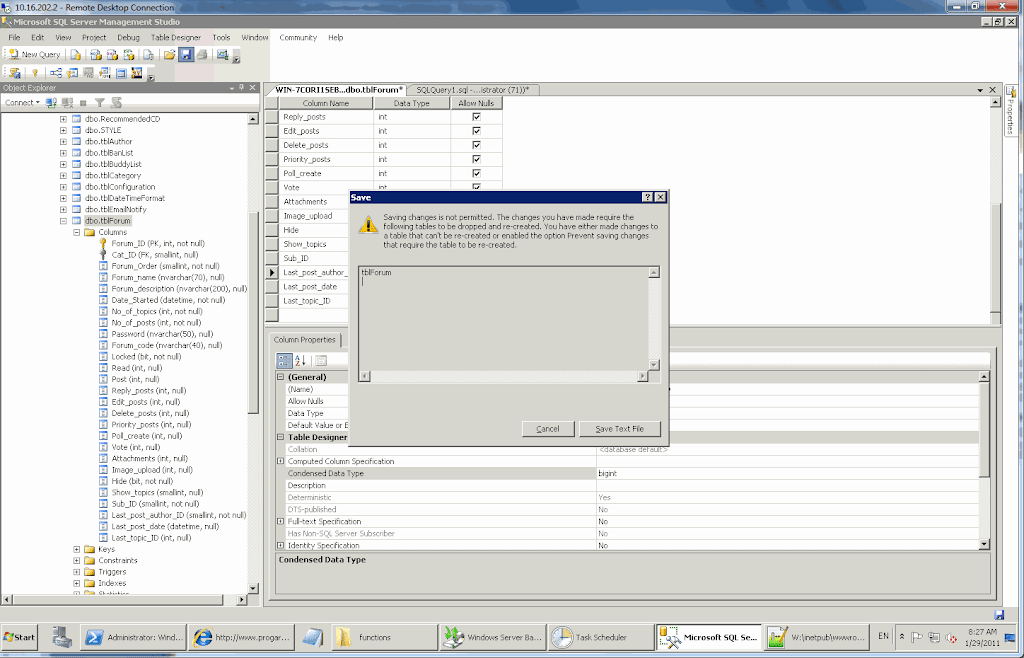
But when I try to change the datatype of the tblForum.Last_post_author_ID to INT or BIGINT I get the error message on the screenshot I attached.
How to do it ?
Thanks
Edited by MaximeRoy77 - 29 January 2011 at 3:06pm
|
 |
MaximeRoy77
Groupie
Joined: 21 November 2010
Location: Québec, Canada
Status: Offline
Points: 54
|
Post Options
Thanks(0)
Quote Reply
Posted: 29 January 2011 at 2:41pm |
Tried to do it manually
ALTER TABLE tblForum ALTER COLUMN Last_post_author_ID int
But, get this... this explains the errors above (screenshot)
Msg 5074, Level 16, State 1, Line 1 The object 'DF__tblForum__Last_p__18F6A22A' is dependent on column 'Last_post_author_ID'. Msg 5074, Level 16, State 1, Line 1 The index 'Last_post_author_ID' is dependent on column 'Last_post_author_ID'. Msg 4922, Level 16, State 9, Line 1 ALTER TABLE ALTER COLUMN Last_post_author_ID failed because one or more objects access this column.
????
|
|
MaximeRoy77
Groupie
Joined: 21 November 2010
Location: Québec, Canada
Status: Offline
Points: 54
|
Post Options
Thanks(0)
Quote Reply
Posted: 29 January 2011 at 2:48pm |
Does dropping and re-creating the constraint and index would work ?
I mean dropping them, making the datatype change and then re-creating them ?
Edited by MaximeRoy77 - 29 January 2011 at 3:22pm
|
|
MaximeRoy77
Groupie
Joined: 21 November 2010
Location: Québec, Canada
Status: Offline
Points: 54
|
Post Options
Thanks(0)
Quote Reply
Posted: 29 January 2011 at 8:23pm |
|
Option above worked. The ADMIN Force Re-Sync Post count, etc give no errors but the number of posts of members have not re-calculated. How to ?
|
|
MaximeRoy77
Groupie
Joined: 21 November 2010
Location: Québec, Canada
Status: Offline
Points: 54
|
Post Options
Thanks(0)
Quote Reply
Posted: 30 January 2011 at 1:41pm |
I managed to fix it by changing to INT the
tblForum.Last_post_author_ID (smallint) to a (int) datatype
This need to be fixed in the upcoming version or my forum won't work in the future release.
Thanks
|
|
MaximeRoy77
Groupie
Joined: 21 November 2010
Location: Québec, Canada
Status: Offline
Points: 54
|
Post Options
Thanks(0)
Quote Reply
Posted: 30 January 2011 at 9:03pm |
|
I had to update the posts count manually for member ID 32919 and above...
|
|
WebWiz-Bruce
Admin Group


Web Wiz Developer
Joined: 03 September 2001
Location: Bournemouth
Status: Offline
Points: 9844
|
Post Options
Thanks(0)
Quote Reply
Posted: 01 February 2011 at 1:47pm |
The tblTopic.Last_post_author_ID should be set to the INT data type. I have checked the database setup files and it is indeed set to the INT Data Type.
It sounds like either the database was not setup correctly or was modified to change it to a SMALLINT Data Type.
As to your error when trying to change the value in SQL Server Studio Manager this is caused by the default settings in SQL Server Studio Manager. So that you can make these types of changes to tables in SQL Server Studio Manager go to:-
Tools -> Options -> Designers
Where you can uncheck the option to 'Prevent saving changes that require table re-creation'
|
|
|
|
MaximeRoy77
Groupie
Joined: 21 November 2010
Location: Québec, Canada
Status: Offline
Points: 54
|
Post Options
Thanks(0)
Quote Reply
Posted: 01 February 2011 at 2:08pm |
No reason I would have change the datatype to SMALLINT 
Here's my theory:
I run the forums since 2004 version 7? And maybe it's the upgrade script that did not made the change on my DB because of that setting "Prevent saving changes that require table re-creation" .
Just a tough ...
|
|