Needs Help With Fixing Picture
Printed From: Web Wiz Forums
Category: General Discussion
Forum Name: Web Design Discussion
Forum Description: Discussion on web design and development subjects.
URL: https://forums.webwiz.net/forum_posts.asp?TID=14923
Printed Date: 29 March 2026 at 10:15am
Software Version: Web Wiz Forums 12.08 - https://www.webwizforums.com
Topic: Needs Help With Fixing Picture
Posted By: Misty
Subject: Needs Help With Fixing Picture
Date Posted: 02 May 2005 at 10:18pm
I use Fireworks, but I cannot figure out how to crop the following picture:
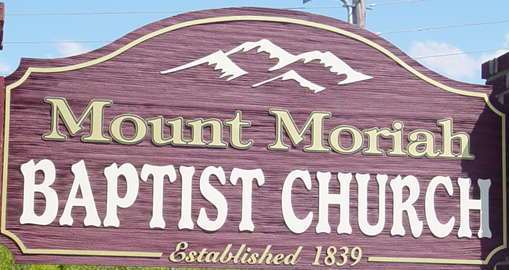 I want to crop the grass out of the picture. I also want to crop out the blue sky and the electrical wires out of this piccture. How do I remove the shadow from the end of the sign?
|
Replies:
Posted By: Gullanian
Date Posted: 03 May 2005 at 12:21am
| For cropping, just click on crop, click and drag the area you want to KEEP, release the mouse button and hit enter. |
Posted By: Misty
Date Posted: 03 May 2005 at 2:22am
| Cropping doesn't really help. The sign is uneven. I also would like to know how to remove the shadow from the side of the sign. |
Posted By: Mart
Date Posted: 03 May 2005 at 2:46am
| Not sure about fireworks but in photoshop there is a lasso tool, use the polygonal one. Just click around the border of the sign and when you reach the other side the sign will be selected. Then go to Edit > Copy Merged create a new document (the size will be automatically generated) with a transparent background, press enter and your done. |
Posted By: Mart
Date Posted: 03 May 2005 at 3:00am
 Now you just have the rotate it a little and sort out the shadow |
Posted By: michael
Date Posted: 03 May 2005 at 9:38am
|
With the shadow you may have to use a copy brush on the reds and do pixel work on the letters. I don't think any filter is smart enough to do it right as you want it. ------------- http://baumannphoto.com" rel="nofollow - Blog | http://mpgtracker.com" rel="nofollow - MPG Tracker |
Posted By: Mart
Date Posted: 03 May 2005 at 11:21am
| To be honest I think you should take the picture again, it is wonky, has a shadow and some of the sign is cut off |
Posted By: Gullanian
Date Posted: 03 May 2005 at 11:52am
| You could probably draw that sign fairly easily, wouldn't look photo realistic but it only compromises of a few elements. |
Posted By: xeerex
Date Posted: 03 May 2005 at 12:11pm
|
I use Fireworks quite extensively and participate at www.geekforum.com
as well (fireworks site). Straightening the picture is trivial;
however, removing the shadows (realistically) will be a pita. I agree
with Mart that you should retake the picture. Note: Rather than use the lasso tool which generally leaves a "crisp" edge, you should try using the eraser tool with a softer edge. Better suggestion: Draw the sign as a vector in FW. Then you can do with it as you wish.  ------------- http://webspacegeeks.com - Need Hosting, Domains, Dedicated Servers? http://www.smartergeek.com - web design | pc support | training | podcasts | video production |
Posted By: Gullanian
Date Posted: 03 May 2005 at 12:25pm
| Would removing shadow really be that hard? You could cut and paste segments over the shadow from other parts of the sign, I've done it before, if your careful it's pretty much unoticable. |
Posted By: xeerex
Date Posted: 03 May 2005 at 12:49pm
If you were careful and used some blurring it can definitely be done, especially it will only be used for web graphics. However, the pic is skewed slightly and that makes it more of a pita IMHO. Here is a quick one I did in FW as a vector. I know its not perfect and the fonts aren't dead ringers, but its a freebie. It will at least get it going. New One as drawn in FW:  Original In Post: And to show the power of the vector, here it is in a larger scale: http://www.rexpage.com/images/Sign_MountMoriah_LG.gif - http://www.rexpage.com/images/Sign_MountMoriah_LG.gif Link To FW png Source at 150dpi: http://www.rexpage.com/images/MountMoriah_ChruchSign.png - http://www.rexpage.com/images/MountMoriah_ChruchSign.png ------------- http://webspacegeeks.com - Need Hosting, Domains, Dedicated Servers? http://www.smartergeek.com - web design | pc support | training | podcasts | video production |
 wrote:
Posted By: Misty
Date Posted: 04 May 2005 at 2:52am
|
Xeerex,
Thank you for modifying the picture! It looks good.
|
Posted By: xeerex
Date Posted: 04 May 2005 at 10:45am
No problem at all. It is drawn as an "all vector" in FireWorks. You can download the source PNG from the link above and open it right up in FW with layers, etc. I didn't use any special filters, but you may/may not need to substitue fonts. ------------- http://webspacegeeks.com - Need Hosting, Domains, Dedicated Servers? http://www.smartergeek.com - web design | pc support | training | podcasts | video production |