error when connecting to SQLServer
Printed From: Web Wiz Forums
Category: Web Wiz Web App Support Forums
Forum Name: Web Wiz Forums
Forum Description: Support forum for Web Wiz Forums application.
URL: https://forums.webwiz.net/forum_posts.asp?TID=20893
Printed Date: 09 April 2026 at 8:26am
Software Version: Web Wiz Forums 12.08 - https://www.webwizforums.com
Topic: error when connecting to SQLServer
Posted By: Constantine287
Subject: error when connecting to SQLServer
Date Posted: 02 August 2006 at 4:14pm
|
it's the first time I run WWF! Okie, when i run WWF v8.03 MSAccess2000 in localhost like this: http://localhost/forum/ the forum work okie, but when I run WWF v8.03 SQLServer in localhost the same like Access version, got error Server Error in Forum Application An error has occured while connecting to the database. Please contact the forum administrator. Support Error Code:- err_SQLServer_db_connection File Name:- common.asp Error details:- Microsoft OLE DB Provider for SQL Server Invalid connection string attribute Plz tell me how to fix this error, thank! |
Replies:
Posted By: WebWiz-Bruce
Date Posted: 02 August 2006 at 5:35pm
|
MS SQL Server isn't a flat file like Access, so you are not connecting to an a file like you do with Access. Do you have an SQL Server instance setup with a database created on it? ------------- https://www.webwiz.net/web-wiz-forums/forum-hosting.htm" rel="nofollow - Web Wiz Forums Hosting https://www.webwiz.net/web-hosting/windows-web-hosting.htm" rel="nofollow - ASP.NET Web Hosting |
Posted By: Constantine287
Date Posted: 03 August 2006 at 5:26pm
|
Yes, I have SQL Server 2000 version Personal and setup it before running the forum. In database_connection.asp, I found code: strSQLServerName = "" 'Holds the name of the SQL Server (This is the name/location or IP address of the SQL Server) strSQLDBUserName = "" 'Holds the user name (for SQL Server Authentication) strSQLDBPassword = "" 'Holds the password (for SQL Server Authentication) strSQLDBName = "" 'Holds the name of the database 'Initilise the DB Connection String strCon = "Server=" & strSQLServerName & ";User ID=" & strSQLDBUserName & ";Password=" & strSQLDBPassword & ";Database=" & strSQLDBName & ";" but how could i get database for the forum? Anyone can up example database of WWF 8.03? |
Posted By: WebWiz-Bruce
Date Posted: 04 August 2006 at 8:51am
|
There is no such version as the personal version of SQL 2000 so I don't know if you are referring to MSDE or SQL 2000, both of which are different (the personal version is more likely to mean MSDE) However, I would recommend that you use SQL 2005 Express instead and install the database is mixed mode. The following instructions are for SQL 2005 Express only. Then use SQL Studio Express to connect to and create a database on the SQL Server (you may need to run the SQL Server Surface Area Config Tool to allow remote connections), followed by creating a user for this database with DBO (Datbase Owner) permissions on the database. Then for the database_connection.asp enter:- strSQLServerName = "localhost\SQLEXPRESS" Only enter localhost\SQLEXPRESS if this is the 2005 Express version and localhost if it is running on the local computer, if running on a remote computer enter the IP address followed by \SQLEXPRESS. You then enter the database name you created and username and password for the other connection details. ------------- https://www.webwiz.net/web-wiz-forums/forum-hosting.htm" rel="nofollow - Web Wiz Forums Hosting https://www.webwiz.net/web-hosting/windows-web-hosting.htm" rel="nofollow - ASP.NET Web Hosting |
Posted By: Constantine287
Date Posted: 04 August 2006 at 7:00pm
sorry, it's SQL Server 2000 Personal Edition http://www.microsoft.com/sql/prodinfo/previousversions/system-requirements.mspx sorry, my confusion. |
 -boRg- wrote:
Posted By: WebWiz-Bruce
Date Posted: 04 August 2006 at 7:10pm
|
Never come across the personal edition before, but it looks like from the link it is much the same as the MSDE version. You should upgrade to the free SQL 2005 Express version as it doesn't have the limitations of the Personal Edition, you can also follow the advice I have given in my last post on installing web wiz forums. Once you have created a blank database on the SQL Server follwo the install instructions that come with the software to run the SQL Setup file which will create the database for you on the blank SQL Server database. ------------- https://www.webwiz.net/web-wiz-forums/forum-hosting.htm" rel="nofollow - Web Wiz Forums Hosting https://www.webwiz.net/web-hosting/windows-web-hosting.htm" rel="nofollow - ASP.NET Web Hosting |
Posted By: WebWiz-Bruce
Date Posted: 04 August 2006 at 7:15pm
|
This is the online version of the install instructions for creating the database:- ../web_wiz_forums/docs_ms_sql_install.asp?mode=forum - Installing Web Wiz Forums SQL Server version on your webspace ------------- https://www.webwiz.net/web-wiz-forums/forum-hosting.htm" rel="nofollow - Web Wiz Forums Hosting https://www.webwiz.net/web-hosting/windows-web-hosting.htm" rel="nofollow - ASP.NET Web Hosting |
Posted By: carywinton
Date Posted: 08 August 2006 at 1:04am
|
I would have to agree with Constantine287,
It seems we are asking the questions, but no one is providing the complete answer, and "PLEASE!" don't say go look at this document here:
http://www.webwiz.net/web_wiz_forums/docs_ms_sql_install.asp?mode=forum - http://www.webwiz.net/web_wiz_forums/docs_ms_sql_install.asp?mode=forum
Because it is very incomplete. I submit this is what I, and I believe, Contantine287 need.
First: a total working example of these lines:
strSQLServerName = "" 'Holds the name of the SQL Server (This is the name/location or IP address of the SQL Server)
strSQLDBUserName = "" 'Holds the user name (for SQL Server Authentication) strSQLDBPassword = "" 'Holds the password (for SQL Server Authentication) strSQLDBName = "" 'Holds the name of the database 'Initilise the DB Connection String strCon = "Server=" & strSQLServerName & ";User ID=" & strSQLDBUserName & ";Password=" & strSQLDBPassword & ";Database=" & strSQLDBName & ";" Not just parts of it, all of it. Like so strSQLServerName = "YourServerName\SQLEXPREESS" 'Holds the name of the SQL Server (This is the name/location or IP address of the SQL Server)
strSQLDBUserName = "IUSR_SERVERNAME" 'Holds the user name (for SQL Server Authentication) strSQLDBPassword = "If your using IUSR_YOURSERVERNAME (then there is no password, leave it blank? put in "null" or what?" 'Holds the password (for SQL Server Authentication) strSQLDBName = "YOURSERVERNAME\SQLEXPRESS\DATABASES\FORUM" 'Holds the name of the database 'Initilise the DB Connection String strCon = "Server=" & strSQLServerName & ";User ID=" & strSQLDBUserName & ";Password=" & strSQLDBPassword & ";Database=" & strSQLDBName & ";" Ok? So does that look correct? Now what about permissions in the SSMSE (SQL Server Management Studio Express) under our new forum database for IUSR_YOURSERVERNAME, should it be db_datareader and db_datawriter? Anything else needed here?
Now the actual folder on our harddrive for the forum "webwiz\forum" Permissions need to be set on this for "not" to allow inheritable permissions to propagate to this object from parent, so we "uncheck" this box. But wait? no other permissions need to be here? like "system" or "administrators"?
So if this is all correct all that should be left to do is run this file 'msSQL_server_setup.asp'
Then proceed to "upload" the files to your web hosting provider, but in my case I am hosting it on my own network and my own server, which all ready have working and dns resolving web sites, so I know my server is working properly.
Now I should be able to "log in" to the forums administration page, if I did not recieve any errors from the 'msSQL_server_setup.asp' script. But what if I did get an error here? what if it is one of those darned "cannot connect to database" errors, then what? Where do I look for the problem? A log file perhaps? Where would it be? What would it be called?
I am sorry if I have seemed to "rant" on a bit here, but I believe this is the proper form and required information needed to respond on a forum.
Thank you for your time and I hope there will be someone who will assist us further. If you desire to call it "having to hold my hand and spoon feed me, so be it" I just want to get this darn thing done and working.
|
Posted By: Constantine287
Date Posted: 08 August 2006 at 11:06am
|
thank -boRg-, but still something wrong when I followed steps at link: http://webwiz.net/web_wiz_forums/docs_ms_sql_install.asp?mode=forum even when I reinstalled SQL Server! Here the step-by-step I worked: Reinstalled SQL Server 2000: 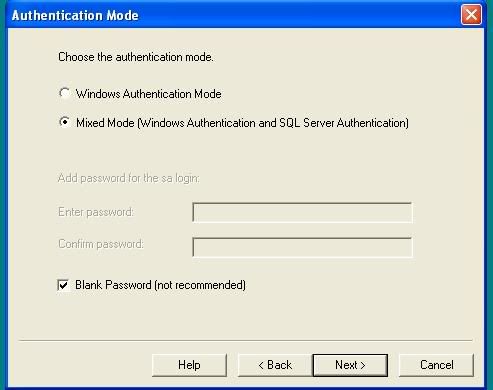 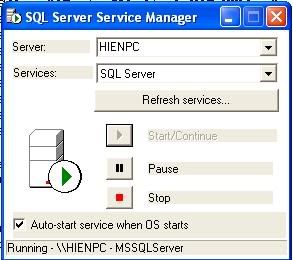 Created a blank database: 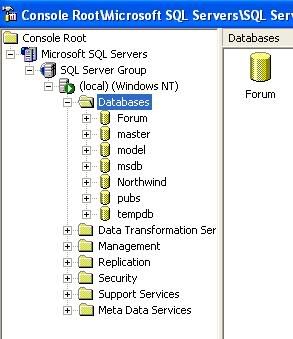 Modified in database_connection.asp  and run msSQL_server_setup.asp 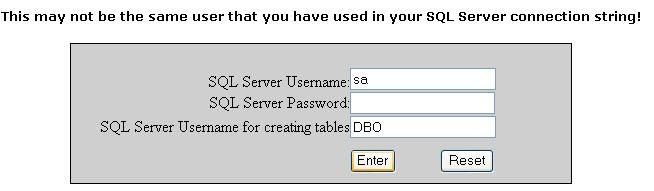 and finally got errors: Server Error in Forum Application An error initialising Global Variables from database. Please contact the forum administrator. Support Error Code:- err_SQLServer_getForumConfigurationData()_get_global_variables File Name:- global_variables_inc.asp Error details:- ADODB.Recordset Operation is not allowed when the object is closed. I have .Net Framework 1.1, .Net Framework 1.1 SDK installed! |
Posted By: WebWiz-Bruce
Date Posted: 08 August 2006 at 11:07am
|
carywinton That looks totally confusing and not correct in many cases, I have never had to setup a SQL Server for web wiz forums in that way. I would stick with the default install instructions that come with web wiz forums as you shouldn't need to mess with IUSR accounts at all except for permissions and you shouldn't be using NT authentication for the database login. ------------- https://www.webwiz.net/web-wiz-forums/forum-hosting.htm" rel="nofollow - Web Wiz Forums Hosting https://www.webwiz.net/web-hosting/windows-web-hosting.htm" rel="nofollow - ASP.NET Web Hosting |
Posted By: WebWiz-Bruce
Date Posted: 08 August 2006 at 11:13am
|
Constentine287 all looks well although you should always give the SQL Server a password and never leave it blank otherwise anyone can get access to it. It looks like you have sorted the connection issue and you are now connecting to the SQL Server database fine. You mention you ran the SQL_server_Setup.asp file but didn't mention if it completed correctly with no errors? ------------- https://www.webwiz.net/web-wiz-forums/forum-hosting.htm" rel="nofollow - Web Wiz Forums Hosting https://www.webwiz.net/web-hosting/windows-web-hosting.htm" rel="nofollow - ASP.NET Web Hosting |
Posted By: Constantine287
Date Posted: 08 August 2006 at 11:54am
After clicked Enter button in msSQL_server_Setup.asp, IE don't put any errors! IE simply load the page msSQL_server_Setup.asp code.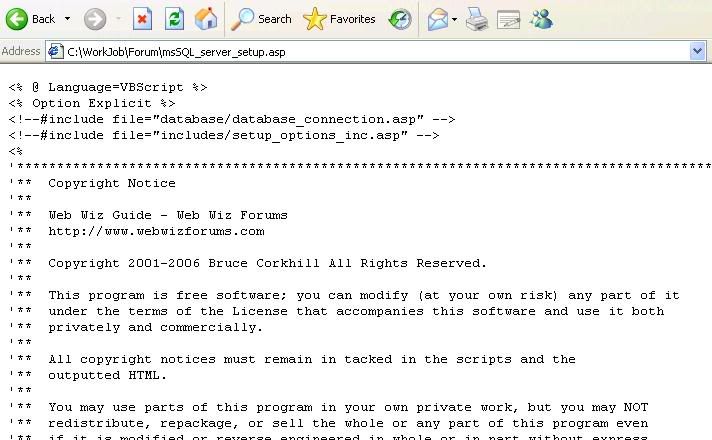 |
Posted By: WebWiz-Bruce
Date Posted: 08 August 2006 at 12:24pm
|
Web Wiz Forums and the setup tool within it are ASP files. This means you need to run it through an ASP enabled web server, simply opening the file in IE won't make it run. ------------- https://www.webwiz.net/web-wiz-forums/forum-hosting.htm" rel="nofollow - Web Wiz Forums Hosting https://www.webwiz.net/web-hosting/windows-web-hosting.htm" rel="nofollow - ASP.NET Web Hosting |
Posted By: Constantine287
Date Posted: 08 August 2006 at 2:04pm
|
Certainly web server used is IIS on winXP Pro. I installed IIS right after installing WinXP Pro, and iis is running. 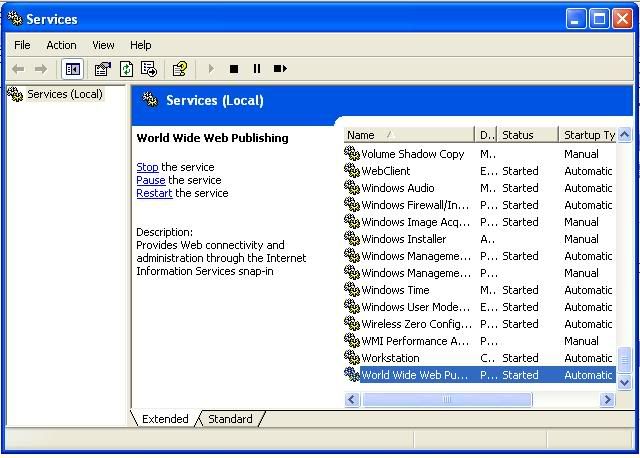 I run msSQL_server_setup.asp it did not create database in blank database created before. error when browse in Internet Information Services: 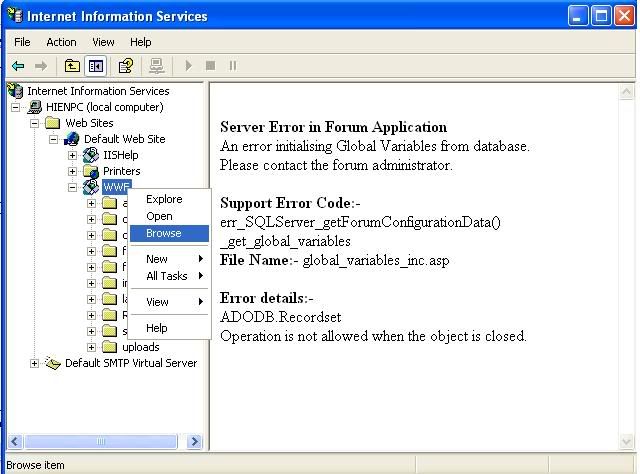 |
Posted By: carywinton
Date Posted: 08 August 2006 at 2:35pm
|
-borg- , All righty then -borg- , what part of this is "NOT" correct, please advise.
Thank you.
|
Posted By: WebWiz-Bruce
Date Posted: 09 August 2006 at 9:51am
|
Constantine287, you need to first create the SQL Sever database,
otherwise the forum will not run and you will get the error you mention. You first need to create a blank database, then run the SQL_server_setup.asp file through an ASP enabled web server (IIS) so that this setup file creates all the tables etc (database schema). required for web wiz froums to store the data. Once this is done the forum will then run, but not before you use trhe setup tool to create the database schema. ------------- https://www.webwiz.net/web-wiz-forums/forum-hosting.htm" rel="nofollow - Web Wiz Forums Hosting https://www.webwiz.net/web-hosting/windows-web-hosting.htm" rel="nofollow - ASP.NET Web Hosting |
Posted By: Constantine287
Date Posted: 09 August 2006 at 10:14am
yes, i created a blank database "Forum" before run msSQL_Server_Setup.asp. msSQL_Server_Setup.asp don't put any error and don't fill any data in blank database!? Only error when I browse http://localhost/WWF/ I really don't know why!! -boRg-, could you run msSQL_Server_Setup.asp and give me filled database. I will restore it in my SQL Server? |
Posted By: carywinton
Date Posted: 09 August 2006 at 3:02pm
|
Constantine287,
I made a discovery dealing with this last night. What I found was two fold dealing with the SQL database and IIS 5.0. First thing is to "NOT" add the Forum folder under or in the same directory as your web site. Why you might ask? Becuse, IIS and SQL will try to "duke" it out over permissions and authentication. When I got my web site to the point where it could be edited and changed to what I needed without difficulty, <enter the ability to use FrontPage here>, I added the "forums" folder as a "virtual directory", this is very important because it keeps the appropriate permissions seperate. Then I created my database using SQL Server 2005 Express with the really nice add-on feature of SQL Server Express Management Studio, commomly refered to as SSMSE. You can obtain it here for free.
http://msdn.microsoft.com/vstudio/express/sql/download/ - http://msdn.microsoft.com/vstudio/express/sql/download/
The management interface makes creating the database and new user much easier than in previous editions. Next thing is to make sure when you create your user for the database and connection string is to create them before you create the new database. This will give them the appropriate permissions and rights for the new user. You user needs to have these three rights or permissions, db_writer, db_reader and db_owner. Then you can edite the connection string for webwiz and proceed to run the setup script. I hope this helps, I fought with it for three weeks until I finally figured it all out.
 |