Little red X and Gray boxes
Printed From: Web Wiz Forums
Category: Web Wiz Web App Support Forums
Forum Name: Web Wiz Forums
Forum Description: Support forum for Web Wiz Forums application.
URL: https://forums.webwiz.net/forum_posts.asp?TID=23848
Printed Date: 07 April 2026 at 6:06am
Software Version: Web Wiz Forums 12.08 - https://www.webwizforums.com
Topic: Little red X and Gray boxes
Posted By: ohiopbx
Subject: Little red X and Gray boxes
Date Posted: 19 July 2007 at 6:55pm
Hey Borg, I was just wondering whats up with the little gray boxes around my options in the top right, and the little red x's over my topic icons (see screen shot below). I verified and all the files are exactly where the "view sources" is pointing. Also this is a screen shot from IE 6.0. In mozilla everything is perfect.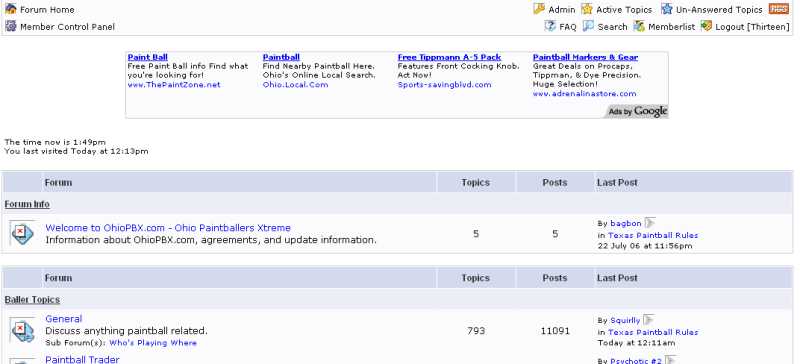 Thanks |
Replies:
Posted By: WebWiz-Bruce
Date Posted: 19 July 2007 at 7:33pm
|
CSS is used to place icons over the top for new post etc. If you are getting an red x then it means that the PNG icons for showing new posts etc. are either missing or now where they should be. However, looking at your forum you have blocks around all your icons which suggests that you are missing the image:- 'forum_images/blank.gif' This image needs to be in this location for IE 5 and 6 to function as they do not natively support alpha transparency, being a crap browser and MS taking 10 years to include this in IE7. This file is required for the IE 5 and 6 transparency active-x filter working which is a workaround for the lack of support for PNG alpha transparency. The sooner people upgrade from IE 6 the better as it really must be the worse browser in existence bar IE 5 which also was buggy as hell. ------------- https://www.webwiz.net/web-wiz-forums/forum-hosting.htm" rel="nofollow - Web Wiz Forums Hosting https://www.webwiz.net/web-hosting/windows-web-hosting.htm" rel="nofollow - ASP.NET Web Hosting |
Posted By: ohiopbx
Date Posted: 19 July 2007 at 7:53pm
|
ah, i think i figured it out: CSS, is pointing to forum_images/ but i removed those images and didnt change it to say forum_images/ohiopbx Thanks Borg, yet again another nail on the head hit! ill try it when i get home tonight  |
Posted By: WebWiz-Bruce
Date Posted: 19 July 2007 at 8:32pm
|
The image:- forum_images/blank.gif Needs to be in that location even if you move the rest of the files. ------------- https://www.webwiz.net/web-wiz-forums/forum-hosting.htm" rel="nofollow - Web Wiz Forums Hosting https://www.webwiz.net/web-hosting/windows-web-hosting.htm" rel="nofollow - ASP.NET Web Hosting |
Posted By: ohiopbx
Date Posted: 19 July 2007 at 8:44pm
|
thanks boRg, that sure did fix it! Genius sheer Genius |