How to delete a member
Printed From: Web Wiz Forums
Category: Web Wiz Web App Support Forums
Forum Name: Web Wiz Forums
Forum Description: Support forum for Web Wiz Forums application.
URL: https://forums.webwiz.net/forum_posts.asp?TID=23940
Printed Date: 28 March 2026 at 3:40am
Software Version: Web Wiz Forums 12.08 - https://www.webwizforums.com
Topic: How to delete a member
Posted By: lavalle
Subject: How to delete a member
Date Posted: 25 July 2007 at 4:07pm
| Maybe I'm blind, but I can't find in the "Membership Admin->Update Member" site a way to delete the selected member. Is there any other place/way to delete one particular member (no batch delete)? |
Replies:
Posted By: WebWiz-Bruce
Date Posted: 25 July 2007 at 4:35pm
|
By editing the members profile as the forum admin
------------- https://www.webwiz.net/web-wiz-forums/forum-hosting.htm" rel="nofollow - Web Wiz Forums Hosting https://www.webwiz.net/web-hosting/windows-web-hosting.htm" rel="nofollow - ASP.NET Web Hosting |
Posted By: lavalle
Date Posted: 25 July 2007 at 4:43pm
| That's exactly the place where I was looking. In a previous version there was a checkbox "delete this member" (or so), which I can't find in 9.0. |
Posted By: WebWiz-Bruce
Date Posted: 25 July 2007 at 4:53pm
|
It's not moved, just make sure you are logged in as the admin
------------- https://www.webwiz.net/web-wiz-forums/forum-hosting.htm" rel="nofollow - Web Wiz Forums Hosting https://www.webwiz.net/web-hosting/windows-web-hosting.htm" rel="nofollow - ASP.NET Web Hosting |
Posted By: lavalle
Date Posted: 25 July 2007 at 4:58pm
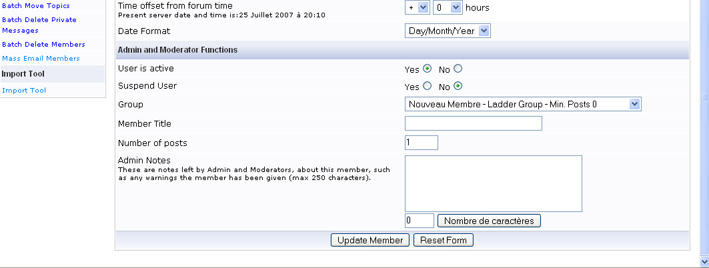
Of course I'm logged in as admin. I can see in the "Admin and Moderator Functions" section:
|
Posted By: WebWiz-Bruce
Date Posted: 25 July 2007 at 5:11pm
|
It's under the admin notes part. It is there as I just double checked by looking at your forum profile, just to make sure that there wasn't a bug stopping it from appearing. ------------- https://www.webwiz.net/web-wiz-forums/forum-hosting.htm" rel="nofollow - Web Wiz Forums Hosting https://www.webwiz.net/web-hosting/windows-web-hosting.htm" rel="nofollow - ASP.NET Web Hosting |
Posted By: lavalle
Date Posted: 25 July 2007 at 5:25pm
|
No, believe me, in my version (downloaded yesterday and installed the "Premium Edition Single Site License") there is only the "Character count" button, and nothing else. Is there something wrong with my installation? P.S.: I just checked the source of "admin_add_member.asp", there is definitely no checkbox behind the "notesChars" input field . |
Posted By: Flyman30
Date Posted: 25 July 2007 at 6:10pm
|
Since
version 9 that is not possible any more since the interface of admin.
On the other hand since the list of the members in the forum to click on the member to erase, to publish and choose it the line administration the check box for delete a member is there. I think that it is about a lapse of memory in the section admin |
Posted By: iSec
Date Posted: 25 July 2007 at 6:16pm
|
I run version 9 on my website and I do have that option... maybe you've modified the registeration page? ------------- "When it gets dark enough, you can see the stars" -Charles A. Beard |
Posted By: Gosia
Date Posted: 25 July 2007 at 6:34pm
|
I have the same problem as lavalle. After we upgraded to version 9.0 the check box "delete member" is gone! Please help! |
Posted By: javi712
Date Posted: 25 July 2007 at 6:47pm
|
I just checked my copy of version 9 and I also have the delete member checkbox option.
You may want to try re-uploading the file again. |
Posted By: Flyman30
Date Posted: 25 July 2007 at 7:13pm
 |
Posted By: Flyman30
Date Posted: 25 July 2007 at 7:22pm
I have re upload the file admin_add_members.asp it the same .... 
|
Posted By: macspudster
Date Posted: 25 July 2007 at 8:27pm
|
Yes, there is no delete feature in the current version 9.0; having downloaded it 3 separate times. I decided to go in to the (SQL Server) database and DELETE all rows in all TABLEs with that Author_ID. I am in the process of writing an SQL script to task this; may post it later on. --- UPDATE: Here's the SQL Script (an SQL Server stored procedure...); Pass it either the AuthorID or UserName. CREATEPROCEDURE [dbo].prcAuthorDelete ( @authorID int = 0 ,@Username nvarchar(25) = '' ) AS IF (@authorID < 1 AND @userName = '') RETURN -1 DECLARE @count int IF (@authorID > 0) BEGIN SELECT @count = count(*) FROM tblAuthor WHERE Author_ID = @authorID IF (@count <> 1) RETURN -1 END IF (@Username <> '') BEGIN SELECT @count = count(*) FROM tblAuthor WHERE Username = @Username IF (@count <> 1) RETURN -1 ELSE SELECT @authorID = Author_ID FROM tblAuthor WHERE Username = @Username END IF (@authorID < 1) RETURN -1 DELETE FROM tblThread WHERE Author_ID = @authorID DELETE FROM tblPollVote WHERE Author_ID = @authorID DELETE FROM tblPollVote WHERE Author_ID = @authorID DELETE FROM tblPollVote WHERE Author_ID = @authorID DELETE FROM tblPMMessage WHERE Author_ID = @authorID DELETE FROM tblPermissions WHERE Author_ID = @authorID DELETE FROM tblEmailNotify WHERE Author_ID = @authorID DELETE FROM tblBuddyList WHERE Author_ID = @authorID DELETE FROM tblAuthor WHERE Author_ID = @authorID RETURN 0 GO ------------- Life is rough, then you fly or fry. |
Posted By: Nick-V
Date Posted: 25 July 2007 at 8:35pm
| Sounds dangerous to me !!! It works on my database...I'd wait for a proper fix if I were you. |
Posted By: Flyman30
Date Posted: 25 July 2007 at 8:39pm
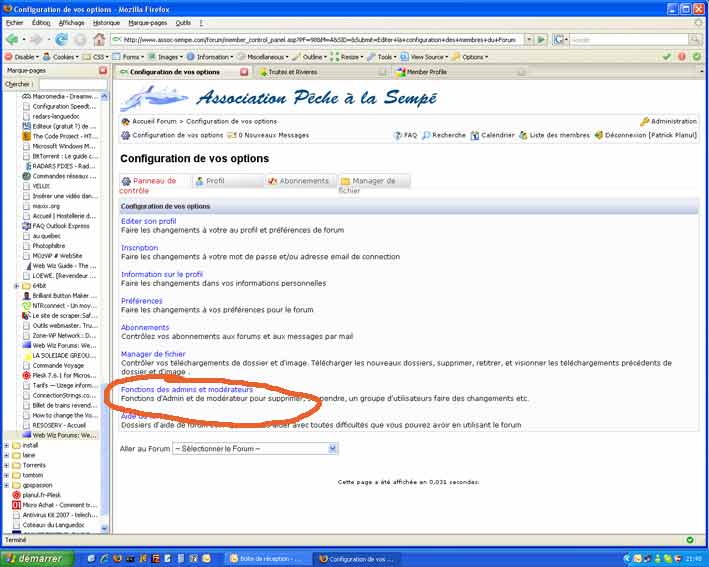
I tell the way to do it on the first page  |
 Nick-V wrote:
Posted By: macspudster
Date Posted: 25 July 2007 at 8:41pm
|
It's only "dangerous" if you don't know what you are doing. I'm a certified DBA, so for me, it isn't "dangerous"; it's implementing a solution for a feature which ISN'T there but should have been; especially if v9.0 is a 'rewrite' or new major version. ------------- Life is rough, then you fly or fry. |
Posted By: macspudster
Date Posted: 25 July 2007 at 8:43pm
Flyman, the 'instructions' you provide on the first page of this post don't make sense... ------------- Life is rough, then you fly or fry. |
Posted By: Flyman30
Date Posted: 25 July 2007 at 8:44pm
But its works fine |
Posted By: Flyman30
Date Posted: 25 July 2007 at 8:53pm
 |
Posted By: Flyman30
Date Posted: 25 July 2007 at 8:54pm
 |
Posted By: macspudster
Date Posted: 25 July 2007 at 9:03pm
OK, lets review each paragraph together, now class, shall we?
"since the interface of admin".... what? where is the rest of the statement? It's an incomplete English sentence.
Can we say "run-on" sentence? There seems to be instructions here, but with the run-on, it is unclear as to which "object(s)" are being referred to.
Again, the preposition comes *after* the subject noun. While it could be inferred / interposed that the writer is trying to state that the programming team may have forgot (lapse of memory) to put the delete feature into the Membership Administration (section admin) area; interpreters we are not. Class dismissed. ------------- Life is rough, then you fly or fry. |
Posted By: macspudster
Date Posted: 25 July 2007 at 9:05pm
Well, the english (American) version tain't got that feature... neither is it anywhere in code.   ------------- Life is rough, then you fly or fry. |
Posted By: Flyman30
Date Posted: 25 July 2007 at 9:12pm
|
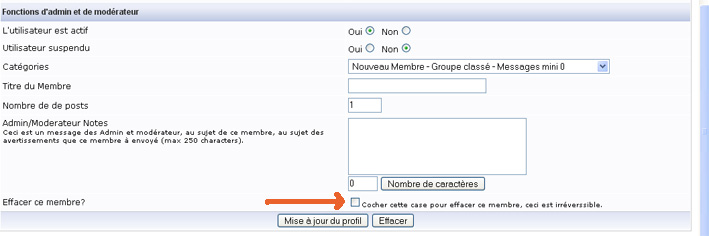
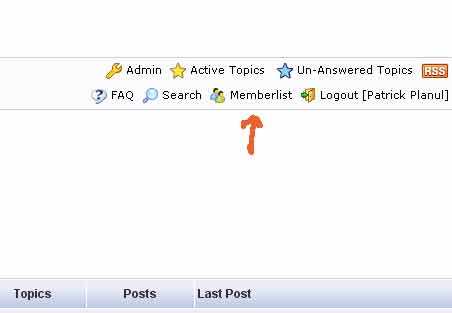
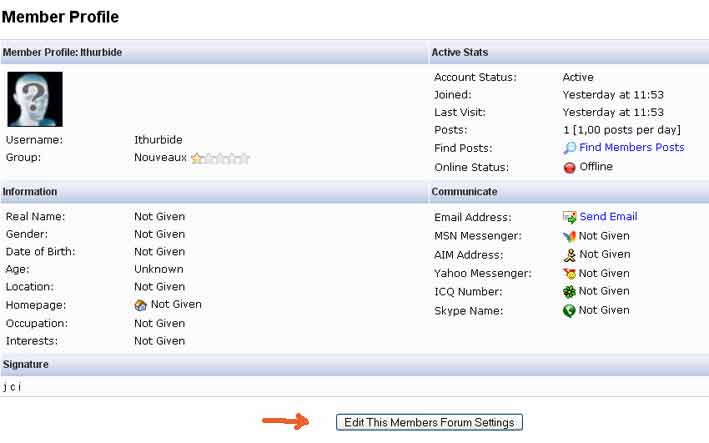
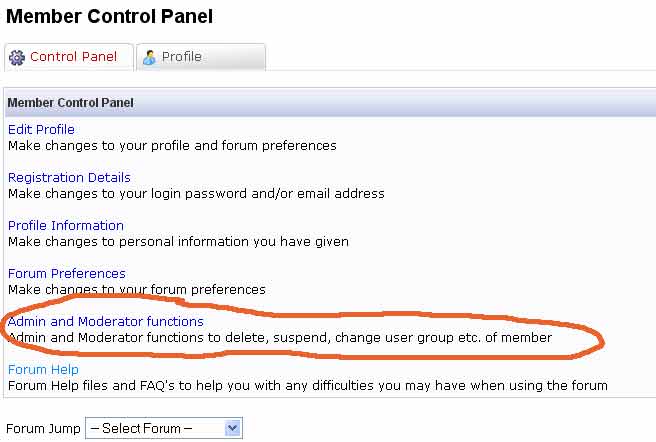
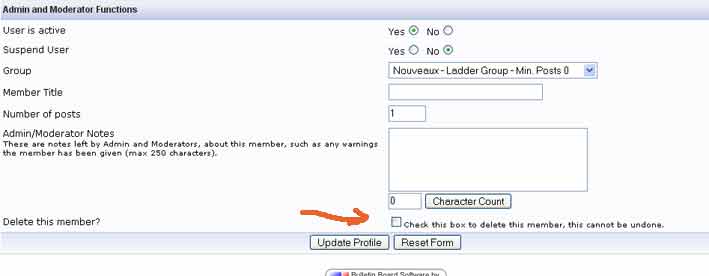
Ho yes it is! in file register.asp as i tell you when you are in the forum area clic on members list (logged in admin) then edit the member and you got it |
Posted By: Flyman30
Date Posted: 25 July 2007 at 9:31pm
Sorry for my bad english it's google translation 
|
Posted By: Nick-V
Date Posted: 25 July 2007 at 9:33pm
|
It's easy to delete records safely.
But a computer professional would advise that it's dangerous and indeed irresponsible to go making changes to data in related tables if you don't know the implications of such changes to the application as a whole.
Borg might do it! But I don't think we should recommend it and post instructions for others unless the approach has been approved.
Wait for a proper fix.
|
Posted By: Gosia
Date Posted: 25 July 2007 at 9:34pm
|
Guys, Can you please give me some clear instuctions how to fix this problem? I have no idea what you are talking about. I have a webmaster who is doing this upgrate for us. Maybe I can forward your instructions to him and resove this problem. Thanks a bunch, |
Posted By: Flyman30
Date Posted: 25 July 2007 at 9:50pm
  |
Posted By: Flyman30
Date Posted: 25 July 2007 at 9:51pm
 |
Posted By: Flyman30
Date Posted: 25 July 2007 at 9:53pm
 |
Posted By: lavalle
Date Posted: 25 July 2007 at 10:02pm
|
Thank you for the hint, indeed, if you go this way it works. But if you log in in as Admin and choose "Membership Admin" in the Admin's "Control Panel Menu", then select the user you want to delet, the checkbox is not visible. I find this behavior a little strange. |
Posted By: Flyman30
Date Posted: 25 July 2007 at 10:03pm
I agree with that and i ask about it too |
Posted By: Neno
Date Posted: 25 July 2007 at 10:09pm
Yes i have noticed this too. The other version I had from this pic there was a delete member under admin notes. This is nolonger here. I had someone being funny sign-up with a popular persons username and beat them to the punch as I moved to a new board. Took me awhile to figure it out. But this is where you are really the Admin in control. I logged into this members fake profile and changed the password and re-assigned it to the rightful person instead of turning the suspend user on. and then just relayed the new passsword on to that person to change once they got in. It is a different set-up and I for one am really liking the changes from the 2.0 I had been running.
I just joined this end of the forum as i am just now using them for my hosting as I moved from the other. nice place to communicate and get answers. thanks.
Neno ------------- http://nenosplace.com - - Neno's Place |
Posted By: Nick-V
Date Posted: 25 July 2007 at 10:12pm
|
Just tested again and I agree...
The delete box does not appear when you use the administrator's facility 'Member Administration' but does when you edit a member's profile 'normally'.
So we have a safe way to delete members and can wait for the admin method to be fixed.
|
Posted By: Neno
Date Posted: 25 July 2007 at 10:14pm
Not on the new 9.0 version with mine. It is not there. ------------- http://nenosplace.com - - Neno's Place |
Posted By: Neno
Date Posted: 25 July 2007 at 10:16pm
|
Bulletin Board Software by http://www.webwizforums.com/ - Web Wiz Forums version 9.01 Copyright ©2001-2007 http://www.webwiz.net/ - Web Wiz ------------- http://nenosplace.com - - Neno's Place |
Posted By: lavalle
Date Posted: 25 July 2007 at 10:18pm
As the topic starter I fully agree with this statement. There's a "workaround" which works, let's wait for a fix on the Admin's site (where it should also work). |
Posted By: Neno
Date Posted: 25 July 2007 at 10:22pm
Oh you say it is in the members profile. i was checking the in the admin controls too let me check..............................
You are correct it is there. Thank you very much...  ------------- http://nenosplace.com - - Neno's Place |
Posted By: Gosia
Date Posted: 25 July 2007 at 10:44pm
|
Flyman30,
Thanks, I got it!!! You the man!!!
|
Posted By: Gosia
Date Posted: 25 July 2007 at 10:52pm
|
Now, bacause we are doing so good so fair I have another problem to solve.
How you can download images from your desktop? If I try to do it from my member control panel, then file manager it gives me an error message: " Error uploading file!! Please use the Browse..' button to select a file to upload." Does anyone have this problem?
|
Posted By: Neno
Date Posted: 25 July 2007 at 11:09pm
|
I been uploading Aviators from my PC to the Forum using the Avaitor upload with no problem. I haven't tried the img storage yet. It seems that the aviator storage squeezes them in. I just read a post in the Aviator section that stated to use 75 for most oin that. ------------- http://nenosplace.com - - Neno's Place |
Posted By: WebWiz-Bruce
Date Posted: 26 July 2007 at 11:22am
This was reported on Monday and has been fixed for version 9.01 which hope to have out in a few days, have a few more little bits to sort through first. The member delete tool is only available in the main forum and hidden away when you edit a users profile. The reason being is it is HIGHLY recommended that you do NOT delete members, and instead suspend members accounts. ------------- https://www.webwiz.net/web-wiz-forums/forum-hosting.htm" rel="nofollow - Web Wiz Forums Hosting https://www.webwiz.net/web-hosting/windows-web-hosting.htm" rel="nofollow - ASP.NET Web Hosting |
Posted By: Gosia
Date Posted: 26 July 2007 at 12:14pm
|
Thank you guys.
 BoRg, we just need to be patient and wait for a better version I guess.
I have few questions/sugestions for you. Do you mind if I ask?
|
Posted By: Nick-V
Date Posted: 26 July 2007 at 2:09pm
|
Borg, thanks for your recommendation to not delete old members.
If you consider this delete facility should be a little hidden, would it not be better to have it in admin only with a much stronger 'are you sure' message that mentions suspensions instead of having it in the main forum?
Personally I think it should be in both places for consistency with a stronger message (or nowhere at all if there are referential integrity or other implications). If things stay as they are it might cause further confusion...
|
Posted By: WebWiz-Bruce
Date Posted: 26 July 2007 at 3:26pm
|
There are a number of issues with the new edit feature in the admin area for members, and both these will be looked into hopefully today, but with so many support questions currently coming in it maybe delayed till tomorrow. ------------- https://www.webwiz.net/web-wiz-forums/forum-hosting.htm" rel="nofollow - Web Wiz Forums Hosting https://www.webwiz.net/web-hosting/windows-web-hosting.htm" rel="nofollow - ASP.NET Web Hosting |
Posted By: macspudster
Date Posted: 26 July 2007 at 4:23pm
|
The "Delete Member" checkbox is on this page: register.asp
And NOT on this page:
admin_add_member.asp
The only page to which the Delete Member should be available is within the Admin control panel pages; not the register page(s).
At that, it should be a button, not a checkbox.
At that, the button should present a new page which uses the CAPTCHA feature to require the Administrator to type in a word and then click "Delete Member". ------------- Life is rough, then you fly or fry. |
Posted By: javi712
Date Posted: 26 July 2007 at 5:13pm
|
Its not that serious. It should definitely NOT have to go through a CAPTCHA page. If you are that concerned about accidentally doing something you shouldn't, you should hand over your admin responsibilities to someone else.
Pretty soon we will all have to start entering a CAPTCHA code for everything we decide to "delete". |
Posted By: WebWiz-Bruce
Date Posted: 26 July 2007 at 5:31pm
|
There has never been a delete option in the admin area, it has always been located in the same place when you edit a users profile in the main forum since about version 4 back 6 years ago! Until today it's never been an issue. It's only since version 9 can you edit a users details from the admin area and this was only added for those using Windows Authentication who are unable to access it from the main frontend, and they don't need to have the delete function as they are using Windows Authentication. Maybe it would have been simpler to only have had the option available for Windows Authentication users. Would have saved all the complaints, as you don't really need this option in the control panel as you have all the options and more available in the main forum. ------------- https://www.webwiz.net/web-wiz-forums/forum-hosting.htm" rel="nofollow - Web Wiz Forums Hosting https://www.webwiz.net/web-hosting/windows-web-hosting.htm" rel="nofollow - ASP.NET Web Hosting |