wwf SQL database size
Printed From: Web Wiz Forums
Category: Web Wiz Web App Support Forums
Forum Name: Web Wiz Forums
Forum Description: Support forum for Web Wiz Forums application.
URL: https://forums.webwiz.net/forum_posts.asp?TID=24469
Printed Date: 06 April 2026 at 1:39pm
Software Version: Web Wiz Forums 12.08 - https://www.webwizforums.com
Topic: wwf SQL database size
Posted By: iSec
Subject: wwf SQL database size
Date Posted: 20 September 2007 at 10:35pm
My forum's MS SQL database size is at 312 MB. Currently, my forum has 20,625 Posts in 2,031 Topics, is this a normal database size for that amount of posts? It was 45 MB two months ago  P.S. This is a MS SQL 2000 server. ------------- "When it gets dark enough, you can see the stars" -Charles A. Beard |
Replies:
Posted By: Nick-V
Date Posted: 20 September 2007 at 10:46pm
|
SQL 2005: Our users have posted 29,538 Posts in 8,678 Topics in 9 Forum(s). We have 13,613 Forum Members. Its 91MB.
Weekly we do a reindex, shrinkdatabase (truncate only to avoid index fragmentation), updatestats.
|
Posted By: javi712
Date Posted: 20 September 2007 at 11:41pm
| It shouldn't be. I have 700 members and 210,000 posts and my db is only 289MB. |
Posted By: iSec
Date Posted: 21 September 2007 at 12:56am
right that's what i mean... in 2 months the db size increased from 45 mb to 312  ------------- "When it gets dark enough, you can see the stars" -Charles A. Beard |
Posted By: Nick-V
Date Posted: 21 September 2007 at 1:00am
|
Do a shrink database and see what happens. But remember to reindex. If you happened to add and then delete a lot of data this is exactly what you will get. |
Posted By: iSec
Date Posted: 21 September 2007 at 1:05am
|
Well, I just went in and looked up the db properties and discovered that the db size is only around 47 MB. But the backup that is done daily is 312 MB, isn;t that weird? The backup is done daily every couple of hours... ------------- "When it gets dark enough, you can see the stars" -Charles A. Beard |
Posted By: Nick-V
Date Posted: 21 September 2007 at 1:13am
| What recovery model are you using and is it the best choice for you? Look at the sizes of the data and transaction log backups. How often do you do a full backup reset the transaction logs....or are they just continuing to grow? |
Posted By: iSec
Date Posted: 21 September 2007 at 1:22am
|
I use the Enterprise Manager tool to schedule the backup... it's the simplest way. The size continues to grow when the differential backup is done every couple of hours... now i changed it from hourly back to daily, and complete backup instead of differential. The first back will be done tonight so let's see how it will be. ------------- "When it gets dark enough, you can see the stars" -Charles A. Beard |
Posted By: Nick-V
Date Posted: 21 September 2007 at 1:32am
|
If you are using differential backups I wonder when was the last full backup was done. Is this helpful:
The size of a differential backup depends on the amount of data that has changed since the base. Generally, the older a base is, the larger a new differential backup will be. A specific differential backup captures the state of changed extents at that time that backup is created. If you create a series of differential backups, a frequently updated extent is likely to contain different data in each differential. As the differential backups increase in size, restoring a differential backup can significantly increase the time that is required to restore a database. Therefore, we recommend that you take a new full backup at set intervals to establish a new differential base for the data. For example, you might take a weekly full backup of the whole database (that is, a full database backup) followed by a regular series of differential database backups during the week.
|
Posted By: iSec
Date Posted: 21 September 2007 at 2:00am
|
Hello Nick, that was a bit confusing... I guess I should just stick to the daily FULL backup...unless there is a better way of doing it. ------------- "When it gets dark enough, you can see the stars" -Charles A. Beard |
Posted By: Nick-V
Date Posted: 21 September 2007 at 8:48am
|
You might want to try out a full recovery model (I use it). Take a full backup once a week and take transaction log backups every day (or every hour if you wish). I think this is what you were aiming for. With this model you can restore to any point in time. It will use the the full backup and add the transactions up to a specific minute so you must keep the files that make up a set.
An alternative is a simple model with a full backup of the database every day (or whatever). Of course with this you could lose up to 99% of a day's work - you can only restore to the last available backup. You must keep one file only.
You can still do it using differentials but remember they hold all changes since the last full backup and not since the last differential backup (like the transactions option). Therefore you only need the last full and one differential (not all transaction files). Because they are bigger files they take longer than transaction backups. You must keep the full backup and latest differential.
It really depends how critical your use is, how frequently changes are made, if you wish to protect against database failure or user error too (deleting whole threads!). Option 1 is good but all sorts of other things can screw up your server too so think about these too.
Always keep more than one full backup generation in case a backup set fails! Keep backups off-site...fire and thieves, etc can kill your database AND your backups!
Good luck.
|
Posted By: iSec
Date Posted: 21 September 2007 at 10:28pm
|
Hello Nick, this sounds good... I see the full recover model can be done from the db properties as shown below, but where would the backup be stored on the server? 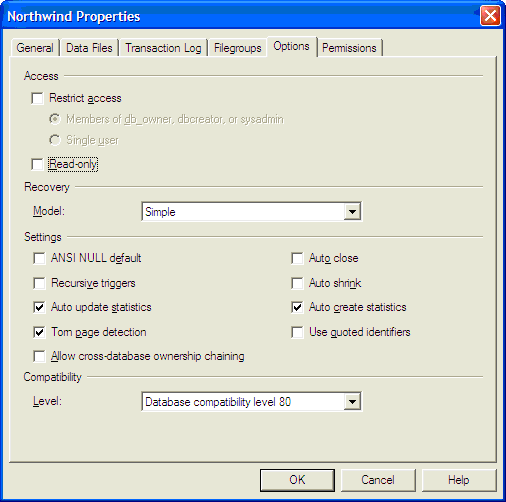 ------------- "When it gets dark enough, you can see the stars" -Charles A. Beard |
Posted By: Nick-V
Date Posted: 21 September 2007 at 11:06pm
|
Where ever you want it stored...normally under C:\Program Files\Microsoft SQL Server\MSSQL\BACKUP and optionally a sub folder for each database.
Setting to Full does not actually make the backups occur. You need to schedule the backups using jobs and maintenance facilities (can't remember sql 2000) but read the help.
|