Running DTS from ASP page
Printed From: Web Wiz Forums
Category: General Discussion
Forum Name: Database Discussion
Forum Description: Discussion and chat on database related topics.
URL: https://forums.webwiz.net/forum_posts.asp?TID=24755
Printed Date: 28 March 2026 at 7:53am
Software Version: Web Wiz Forums 12.08 - https://www.webwizforums.com
Topic: Running DTS from ASP page
Posted By: Gary
Subject: Running DTS from ASP page
Date Posted: 05 November 2007 at 1:11pm
|
Hi,
I am trying to run a DTS from an asp page and have had some success, but now I am struggling when it comes to data pump tasks that import data from an Excel file.
My environment is this:
Webserver
Database Server (SQL 2000)
When I run the DTS from Ent Manager it works fine.
When I run from the asp page all SQL tasks work, but the Data Pump fails.
I have played around with the security of folder in which the Excel file is located, but to no avail.
When I built the code I did so in a single server environment (single machine acting as webserver and database server) and it ran just fine.
Now in a 2 server environment it fails which suggests maybe a permissions issue with accessing the data (Excel) file. But having toyed with the folder permissions I cant help but think that there is more tp it than that.
Any ideas?
Thanks
Gary
|
Replies:
Posted By: socialanimal
Date Posted: 05 November 2007 at 1:50pm
Here's the code I use to do the exact same thing, the code will tell you where it's failing which is obviously the first thing you need to make sure of. It does sound like it is a permissions issue, but before going any further and speculating, it's probabaly easier to find out where its failing (at which step) and go on from there.
|
Posted By: Gary
Date Posted: 05 November 2007 at 2:08pm
|
Thanks for the suggestion....
I have used similar code to identify the step that is failing and it is indeed the Data Pemp step from the Excel file.
Furthermore, if I remove the Data Pump step, then the package completes successfully.
Conclusion is that there is definitely a permissions issue.
Problem remains that I cannot over it.
IIS is running under Windows Authetication only. Connection is using a DSN on the IIS server which points to the database on the remote database server.
Now I thought that with the above, access to the source Excel file would be using my user credentials. My user definitely has access to the file.
|
Posted By: ctscott
Date Posted: 05 November 2007 at 2:38pm
|
thanks Socialanimal. i've always figured you could do it but didn't know how or what to search for. ------------- ______________________ http://www.cfbtrivia.com" rel="nofollow - College Football Trivia |
Posted By: socialanimal
Date Posted: 05 November 2007 at 2:44pm
Just to bounce some questions off you so that we can try and get to the bottom of this then: On the SQL Server, who are you logged in as ? Yourself or a built - in account (eg administrator). On the excel file itself, do you have the inherited permissions for the entire folder ? And on the excel file you're only reading the information ? Have you tried using anyone elses authentication when executing the DTS ? If so, did that work ? |
 Gary wrote:
Posted By: socialanimal
Date Posted: 05 November 2007 at 2:45pm
No sweat mate. Very handy tool. Don't really have a call to execute it in ASP so much, generally run it as a scheduled task overnight. |
Posted By: Gary
Date Posted: 05 November 2007 at 2:52pm
|
On the SQL Server, who are you logged in as ? Yourself or a built - in account (eg administrator). The server is logged on with a domain account that is a member of the local admins group on both the web and SQL server. On the excel file itself, do you have the inherited permissions for the entire folder ? And on the excel file you're only reading the information
Yes, the Excel file has the inherited perms (everyone has Full Control access)
And on the excel file you're only reading the information ?
Yes, all I am doing is having the Excel file as a data source and using a Data Pump task to pull the data into SQL Have you tried using anyone elses authentication when executing the DTS ? If so, did that work
Yes, I even tried using the domain account that I mentioned above (the one that is a member of local admin group) and it didnt work
|
Posted By: Gary
Date Posted: 05 November 2007 at 3:00pm
|
I cant help but feel that when the DTS is invoked via an asp, it is not using any windows based authentication when trying to access the Excel file.
The code example provided above uses a SQL User Account to run the DTS - could that be part of the problem? If so, how do I run the same but using a domain account?
|
Posted By: socialanimal
Date Posted: 05 November 2007 at 3:02pm
Ok thats even stranger, if all permissions and everything are set to how they should be  Can you run a trace in the SQL profiler and see exactly what it says in there ? ... |
Posted By: socialanimal
Date Posted: 05 November 2007 at 3:05pm
|
Found this: http://www.asp101.com/articles/carvin/dts/default.asp Got some interesting points about what accounts are used when executing DTS from web page. |
Posted By: Gary
Date Posted: 05 November 2007 at 3:05pm
|
I'll give that a go and report back.
In the meantime, I enabled error logging and this is what I got:
|
Posted By: socialanimal
Date Posted: 05 November 2007 at 3:10pm
Do i take it that task_1 is the excel file being used as a data source ? If its trying to create a file using the IIS account, this could be to blame. |
Posted By: Gary
Date Posted: 05 November 2007 at 3:15pm
|
Yes, task_1 is where I try to import data from the Excel file.
"If its trying to create a file using the IIS account" - I am not creating a file inthe DTS. All I am tryingto do is read from a file (Excel) and imprt the data from the file into a SQL table.
|
Posted By: socialanimal
Date Posted: 05 November 2007 at 3:21pm
|
Hmmm .... The createfile() error in the description is covered in the MSKB http://support.microsoft.com/kb/q175671/. This may help ? |
Posted By: Gary
Date Posted: 05 November 2007 at 4:27pm
|
Interesting MSKB article there.... I have tried running SQL Setup (from the CD) but cannot see anything to do with "Change Network Support". For something that you'd expect to be pretty much straight forward, this is turning into a nightmare
 |
Posted By: socialanimal
Date Posted: 05 November 2007 at 4:29pm
|
Yeah can imagine ! I'm trying to consider what it could possibly be, other than it being an issue with the incorrect user login being used (ie the IIS account rather than your own). Could you post the code your using (obviously minus the authentication details)  |
Posted By: Gary
Date Posted: 05 November 2007 at 4:40pm
Here's the code that I am using (excluding all presentation and error handling)....
The DTS package basically has a SQL Connection to the DB itself, a SQL Task that deletes data from TableX, an Excel connection and a Data Pump that imports data from Excel to TableX
|
Posted By: socialanimal
Date Posted: 05 November 2007 at 4:54pm
| As the "sa" / "password" combo is a default SQL server authentication method, is this what your actually using in your script ? |
Posted By: Gary
Date Posted: 05 November 2007 at 5:06pm
|
Yes I am using the sa account and the associated password (which incidentally isn't "password").
The asp script is using SQL Server authentication and the SQL connection within the DTS package is also using the SQL Server authentication.
Should I be using a domian account to connect the asp to SQL and if so, how do I go about doing that?
|
Posted By: socialanimal
Date Posted: 05 November 2007 at 5:13pm
|
No it should be using the SQL server account so thats correct, its the permissions in the script thats failing for some reason. Could you try replacing the DTSSQLStgFlag with the following - DTSSQLStgFlag_UseTrustedConnection and see what the results are, if any? |
Posted By: Gary
Date Posted: 05 November 2007 at 5:39pm
OK, I get the same error when I change the script to use:
If I then remove the SQL Account details:
I get the following:
Now, the strange thing is that user 'fanle01' is an actual domain account,but where is it picking this up from? It certainly is not in any of my scripts, connections, etc. Most strange!
(I haven't checked what permissions 'fanle01' has - should I check, and if so, what should I check - folder/file perms / SQL perms?)
|
Posted By: socialanimal
Date Posted: 05 November 2007 at 5:49pm
|
Ok, It looks like we're finally hitting the correct spots with our troubleshooting. On the PC which is running IIS who is logged on to this machine ? On the PC which is running SQL 2000 who is logged in to this machine ? What kind of NT account does fanle01 have ? Is it a domain user / admin ? What kind of permissions do they have ? Ideally I think we need to be looking at the NT user account which is trying to execute this. Could you try putting the code into a vbs file and running it from your workstation and log any results ? |
Posted By: Gary
Date Posted: 05 November 2007 at 6:03pm
|
Both the web and database servers are logged in under a different domain account which is a member of the local admins group on both boxes.
fanle01 is a standard user account on the domain. However it does have access to the folder in whoch the Excel file is located and admin access to the SQL Server installation.
Now I come to think about it - I did get 'fanle01' to log onto my laptop a week or so ago. And I have just had confirmation from the user that he changed his password at the end of last week. Maybe the user / password are somehow cached on my laptop? Thing is though, why is it picking up that user account and not mine that I am currently logged on as?
As far as getting the code into a vbs is concerned, I'm afraid I dont really know how to do that. I saved as a VB .bas file and tried running, but it came up with user defined type errors.
|
Posted By: socialanimal
Date Posted: 05 November 2007 at 6:08pm
|
The first post I made on this thread was taken directly from a .vbs file simply copy and paste that in to a text file and save as filename.vbs but replace the response.write with msgbox. To check if it is using a cached version of fanle01's credentials (though like you i don't see why it should) then try creating a test asp page to write out request.servervariables("AUTH_USER") then at least you can confirm or deny this theory. Lets go from there and see how we get on. |
Posted By: Gary
Date Posted: 05 November 2007 at 6:19pm
|
Success - I created the .vbs and ran directly from my laptop.
I used the following:
......LoadFromSQLServer "servername", "sa", "password", SQL_Server_TblName, "", "".......
So that kind of suggests something wrong with IIS, but what?
|
Posted By: socialanimal
Date Posted: 05 November 2007 at 6:21pm
|
Good question lol. Did you try the test asp page to check which NT credentials it's using ? |
Posted By: socialanimal
Date Posted: 05 November 2007 at 6:27pm
| Or ... have you tried the exact script that worked in the VBScript in an ASP document to see if this worked ? |
Posted By: Gary
Date Posted: 05 November 2007 at 6:27pm
|
Ah, yes - sorry I forgot to say....
When I queried the servervariables it returned my domain account.
Still no idea where fanle01 comes into it
 |
Posted By: socialanimal
Date Posted: 05 November 2007 at 6:32pm
| That is extremely strange. I'm just seeing if theres another way we can go through the authentication process. There MUST be a way to also specify an NT user credentials. I will let you know when I find something. |
Posted By: Gary
Date Posted: 05 November 2007 at 6:34pm
|
Cheers - BTW I just plugged the VBS code directly into an ASP and only changed msgbox to response.write
Same errors as before
I really appreciate your input on this.
|
Posted By: socialanimal
Date Posted: 05 November 2007 at 6:37pm
| It has to be cached authentication. Thats the only thing thats going through my mind at the moment. You mentioned that you're using a laptop? Does this mean you're not manually logged into your network ? |
Posted By: Gary
Date Posted: 05 November 2007 at 6:44pm
|
"Does this mean you're not manually logged into your network ? " - Not sure I understand what you mean......Yes I'm working on my laptop which is connected to the network and I am logged onto the domain. Incidentally, I copied the asp file over to another box running IIS (with Windows Authentication) amnd got this....
|
Posted By: socialanimal
Date Posted: 05 November 2007 at 6:55pm
|
Ok this is getting stranger ... A few questions that come to mind ?
|
Posted By: Gary
Date Posted: 05 November 2007 at 7:01pm
|
Sorry, I dont know whether I am using local or roaming profile? Using the other box I can connect to the db through IIS
I am not logged onto the other box directly
I think that is all my brain can take today. I shall go home and sleep on it.
Let me know if you have any more suggestions.
Again, I really appreciate the effort that you are putting into this.
|
Posted By: socialanimal
Date Posted: 05 November 2007 at 7:04pm
| ok no problem ... will keep looking into this for you |
Posted By: socialanimal
Date Posted: 06 November 2007 at 1:14pm
| Have you tried accessing the web page (that executes the dts) from another machine ? |
Posted By: Gary
Date Posted: 06 November 2007 at 2:23pm
|
Yes, and I get exactly the same errors back..... Accessing page returns the "Login failed for user 'fanle01'" error (machine accessing the page is not logged on under the fanle01 account.
|
Posted By: socialanimal
Date Posted: 06 November 2007 at 2:32pm
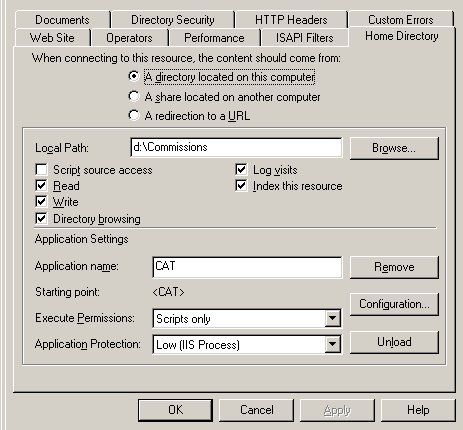
| How are the permissions setup in IIS ? Do you have the default IIS account enabled or disabled for anonymous login? Do you use integrated windows authentication or another option ? In the home directory tab, which options do you have selected (ie read, write, execute etc)? |
Posted By: Gary
Date Posted: 06 November 2007 at 3:01pm
|
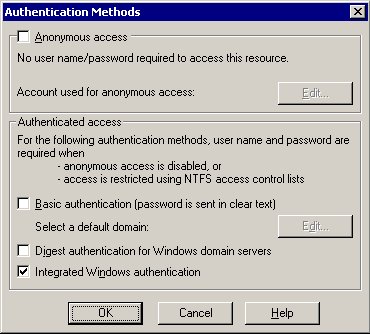
IIS is configured as follows: Integrated Windows autentication only
(not sure about the default IIS account though - how can I find this?)
 |
Posted By: socialanimal
Date Posted: 06 November 2007 at 3:47pm
 To view it go into the directory security and edit tab, that will bring up the above dialog screen. I'm just checking things now ... I honestly don't think it would be the cache now we've tested other things but I could be wrong. |
Posted By: Gary
Date Posted: 06 November 2007 at 4:45pm
IIS is using Windows Authetication only we need to capture the user's id with Request.ServerVariables("LOGON_USER")
 |