Picture Upload Size Problem
Printed From: Web Wiz Forums
Category: Web Wiz Web App Support Forums
Forum Name: Web Wiz Forums
Forum Description: Support forum for Web Wiz Forums application.
URL: https://forums.webwiz.net/forum_posts.asp?TID=24847
Printed Date: 06 April 2026 at 11:59am
Software Version: Web Wiz Forums 12.08 - https://www.webwizforums.com
Topic: Picture Upload Size Problem
Posted By: oilleak
Subject: Picture Upload Size Problem
Date Posted: 17 November 2007 at 3:46pm
|
I have searched for posts addressing this issue and didn't find any, but if I missed it I apologize. Just had an issue come up where a member uploaded a picture file with a size of 1024 x 768 pixels. The upload pop up in Web Wiz truncated the width to 102. Upon further investigation, the max width seems to be 999. I am using a licensed version of 9.06. Here is my question. Is the max size of picture uploads set in the file RTE_popup_adv_image.asp? It seems that it may just be a question of changing the form input size from 3 to 4. Thanks. ------------- Oilleak Those who give up liberty for the sake of security deserve neither liberty nor security. --- Ben Franklin |
Replies:
Posted By: WebWiz-Bruce
Date Posted: 17 November 2007 at 3:49pm
|
The forum software doesn't do anything to image widths, the user may have resized it themselves.
------------- https://www.webwiz.net/web-wiz-forums/forum-hosting.htm" rel="nofollow - Web Wiz Forums Hosting https://www.webwiz.net/web-hosting/windows-web-hosting.htm" rel="nofollow - ASP.NET Web Hosting |
Posted By: oilleak
Date Posted: 17 November 2007 at 4:26pm
Here is what I am referring to. The image size is 1024 x 768. The width is truncated to 102 by default. The user can only input a width size of up to 999.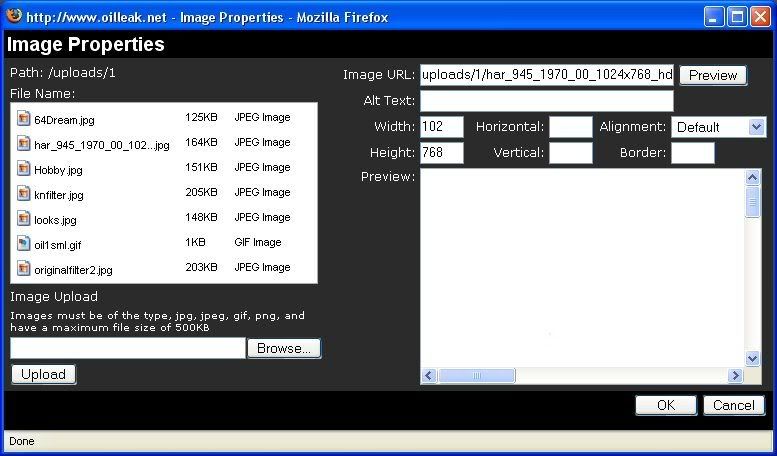 ------------- Oilleak Those who give up liberty for the sake of security deserve neither liberty nor security. --- Ben Franklin |
Posted By: oilleak
Date Posted: 17 November 2007 at 5:12pm
|
I changed the MAXLENGTH attribute in the Form input of the file RTE_popup_adv_image.asp line 357 from "3" to "4" and it solved the issue. <td width="4%"><input name="width" type="text" id="width" size="3" maxlength="4" onkeyup="changeImage()" autocomplete="off" /></td> ------------- Oilleak Those who give up liberty for the sake of security deserve neither liberty nor security. --- Ben Franklin |