Issues with Google Chrome
Printed From: Web Wiz Forums
Category: Web Wiz Web App Support Forums
Forum Name: Web Wiz Forums Modifications
Forum Description: Mod's and Add-on's for Web Wiz Forums.
URL: https://forums.webwiz.net/forum_posts.asp?TID=27102
Printed Date: 29 March 2026 at 3:37pm
Software Version: Web Wiz Forums 12.08 - https://www.webwizforums.com
Topic: Issues with Google Chrome
Posted By: SteveCorder
Subject: Issues with Google Chrome
Date Posted: 12 March 2009 at 1:45pm
I'm a long time user of WWF, and am planning an upgrade to 9.x. I have been testing the latest version locally, and have a recurring issue with Google Chrome (I've noticed this on several of your other applications too): Is there a way of solving the form height issue? I presume that it's because of Chrome having the address at the top of the form, and I'm sure it's a pretty simple fix.
Thanks in advance, Steve |
Replies:
Posted By: WebWiz-Bruce
Date Posted: 12 March 2009 at 2:26pm
|
Google Chrome uses Apples Safari rendering engine. Web Wiz Forums has been tested in both Apple Safari and Google Chrome and can not find the issue you mention. In tests here there is quite a space between the button and the bottom of the window. Your screen shot does not display the top of the window so not sure if you have some plugin which sits at the top of your browser window, but having the address bar at the top should not make a difference. ------------- https://www.webwiz.net/web-wiz-forums/forum-hosting.htm" rel="nofollow - Web Wiz Forums Hosting https://www.webwiz.net/web-hosting/windows-web-hosting.htm" rel="nofollow - ASP.NET Web Hosting |
Posted By: SteveCorder
Date Posted: 23 March 2009 at 10:15am
|
Image Popup on Google Chrome:  Image Popup on Safari:
 Chrome may be using the Safari engine, but as you can see - there are differences and a height issue. I also get the error message: "Error inserting object in current location" on both these browsers.
cheers,
Steve
|
Posted By: SteveCorder
Date Posted: 23 March 2009 at 10:16am
| By the way - the above screenshots are from replying to this post. |
Posted By: WebWiz-Bruce
Date Posted: 23 March 2009 at 2:53pm
|
Have tested again and still can not find the problem you are seeing. Having the address bar at the top should make no difference as other browsers like Firefox do this also. Here is a screen shot from Google Chrome:- 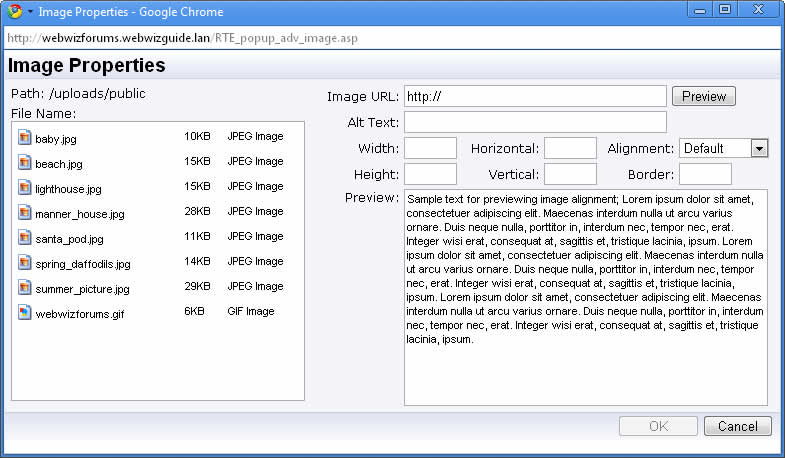 If you get the error message about inserting the object then it means that you did not have the cursor in a location where an image can be inserted when you clicked the insert image button and it therefore gives you an error saying that the image can not be inserted in that location. ------------- https://www.webwiz.net/web-wiz-forums/forum-hosting.htm" rel="nofollow - Web Wiz Forums Hosting https://www.webwiz.net/web-hosting/windows-web-hosting.htm" rel="nofollow - ASP.NET Web Hosting |
Posted By: MadDog
Date Posted: 23 March 2009 at 10:08pm
|
Fonts look different between the screen shots... that might cause the difference... ------------- http://www.iportalx.net" rel="nofollow"> 
|
Posted By: WebWiz-Bruce
Date Posted: 24 March 2009 at 8:11am
|
Same fonts and the same sizes just that one is using 'Clear Type' that is meant to make fonts easier to read, but just make it harder. Looking at both screen shots the window in SteveCorder's post is allot smaller. There was an update a few releases ago that increased the window size of the the 'Insert Image' window. Steve it maybe worth checking that you have updated all the files in your installation to the latest version, especially the includes/RTE_toolbar_inc.asp file. ------------- https://www.webwiz.net/web-wiz-forums/forum-hosting.htm" rel="nofollow - Web Wiz Forums Hosting https://www.webwiz.net/web-hosting/windows-web-hosting.htm" rel="nofollow - ASP.NET Web Hosting |
Posted By: SteveCorder
Date Posted: 06 April 2009 at 6:20am
| Could this be a Windows Vista thing? |
Posted By: WebWiz-Bruce
Date Posted: 06 April 2009 at 10:56am
|
I doubt it the screen shot I posted above is from a Vista PC. Your windows are smaller, I still have a feeling that you have not updated some of your files to the latest release such as the includes/RTE_toolbar_inc.asp and you are therefore opening a smaller window for for older versions. ------------- https://www.webwiz.net/web-wiz-forums/forum-hosting.htm" rel="nofollow - Web Wiz Forums Hosting https://www.webwiz.net/web-hosting/windows-web-hosting.htm" rel="nofollow - ASP.NET Web Hosting |
Posted By: SteveCorder
Date Posted: 06 April 2009 at 11:10am
As I said - these screenshote were taken from your own forum.
On further investigation, it seems the issue only occurs with Vista Aero theme running |
 WebWiz-Bruce wrote:
Posted By: dougl
Date Posted: 07 April 2009 at 6:38pm
| that is exactly what the problem is... Vista AERO - I see the same issue when running it... |
Posted By: 123Simples
Date Posted: 07 April 2009 at 7:19pm
I have Windows Vista with Aero running and checking this using Google Chrome (which I dont particularly rate anyway as a browser) but this is how it pans out: I cannot see any issues but maybe my vista is updated and such forth  ------------- http://www.123simples.com/" rel="nofollow - Visit 123 Simples Web Design |