Upgrading 9 to 10 permission on database denied
Printed From: Web Wiz Forums
Category: Web Wiz Web App Support Forums
Forum Name: Web Wiz Forums
Forum Description: Support forum for Web Wiz Forums application.
URL: https://forums.webwiz.net/forum_posts.asp?TID=29985
Printed Date: 01 April 2026 at 1:00am
Software Version: Web Wiz Forums 12.08 - https://www.webwizforums.com
Topic: Upgrading 9 to 10 permission on database denied
Posted By: slappyJ
Subject: Upgrading 9 to 10 permission on database denied
Date Posted: 25 November 2011 at 1:15am
|
I am uprading my forum and I am stuck...I am using Windows 7.
I cannot seem to uncheck the Read only attribute on the database folder. It keeps coming back...and I cannot complete the database upgrade...I keep getting this error:
Please check that you have Read, Write, and Modify Permissions on the Web Wiz Forums 'Database' Directory.
Any workarounds? I have updated many newer versions of Web Wiz in the past with no permission errors. Dealing with my host is always a pain the arse...they never understand what I am trying to accomplish.
Also I noticed that when upgrading anyone who goes to the /forum can see the upgrade process eventually seeing all of the database settings (database_connection.asp) including the sql name/user and database...this is bad?????
 Thanks
|
Replies:
Posted By: WebWiz-Bruce
Date Posted: 25 November 2011 at 8:30am
|
Permissions have to be set on the server by your host. They can not be set remotely. If the upgrade fails you need to immediately replace the database/database_settings.asp file with the original to keep your settings safe. ------------- https://www.webwiz.net/web-wiz-forums/forum-hosting.htm" rel="nofollow - Web Wiz Forums Hosting https://www.webwiz.net/web-hosting/windows-web-hosting.htm" rel="nofollow - ASP.NET Web Hosting |
Posted By: slappyJ
Date Posted: 25 November 2011 at 10:11am
|
Thanks for the tips...I will try my luck tomorrow. But before I do I must backup my database. Are there any good programs you can recommend to accomplish this? My forum uses the Microsoft SQL Server 2000 version. |
Posted By: WebWiz-Bruce
Date Posted: 25 November 2011 at 10:16am
|
You need admin privileges on the server to create a backup (.bak file). If you are using a web host then most good web hosts will give you an online tool in your hosting control panel to create backups with. ------------- https://www.webwiz.net/web-wiz-forums/forum-hosting.htm" rel="nofollow - Web Wiz Forums Hosting https://www.webwiz.net/web-hosting/windows-web-hosting.htm" rel="nofollow - ASP.NET Web Hosting |
Posted By: slappyJ
Date Posted: 30 November 2011 at 5:18pm
|
This is the response that my host gave me... "Unfortunately, the access is restricted. We can provide a flat file backup, then you would be able to import it in your system, upgrade. For importing/backup database only, you can use DTS/SSIS." I dont' remember any previous upgrades being such a hassle. |
Posted By: WebWiz-Bruce
Date Posted: 30 November 2011 at 6:27pm
|
The flat file is presumably the full backup file of the database (the .bak file I mentioned before). If you get your web host to supply this to you, if things go horribly wrong you can get them to restore the database from this backup file. The upgrade from version 9 to version 10 will be bigger than upgrades within the same family (eg 9.01 to 9.70) as these would not have any database changes. Major versions introduce new features that require the database to be modified. ------------- https://www.webwiz.net/web-wiz-forums/forum-hosting.htm" rel="nofollow - Web Wiz Forums Hosting https://www.webwiz.net/web-hosting/windows-web-hosting.htm" rel="nofollow - ASP.NET Web Hosting |
Posted By: slappyJ
Date Posted: 08 December 2011 at 6:09pm
|
The only way that my host will allow me to upgrade to version 10 is for them to backup the database, make it available to me for download and then perform the upgrade locally on my own computer...then send them the upgraded database so they can restore it. Is there any potential problems upgrading this way?...unfortunately my host does not allow me to manipulate the database as I would prefer. |
Posted By: WebWiz-Bruce
Date Posted: 09 December 2011 at 7:46am
|
Yes you can do it this way, but seems like your web host are making allot more trouble for you than is needed. ------------- https://www.webwiz.net/web-wiz-forums/forum-hosting.htm" rel="nofollow - Web Wiz Forums Hosting https://www.webwiz.net/web-hosting/windows-web-hosting.htm" rel="nofollow - ASP.NET Web Hosting |
Posted By: slappyJ
Date Posted: 09 December 2011 at 8:00pm
|
This has turned out to be a 2 week disaster with my current host...they DO NOT and WILL NOT provide me with write access to my database...nor will they let me download it. They provided me with a backup file (.bak) but now I don't even know what to do with it. I have SQL Server Management Studio Express 2005 but from my research it sounds like I need some kind of Configuration Manager? I have a feeling that only the full version has that? |
Posted By: WebWiz-Bruce
Date Posted: 12 December 2011 at 2:02pm
|
I still think you are getting the wrong end of the stick. You would have write permission on the database as you can save posts to it. What you need write permissions set on is the 'database' folder. This is the folder in your Web Wiz Forums directory that stores files that contain your database settings. You need to have write permissions set on this folder so that the setup/wizard can write the database configuration details to the files in this 'database' folder. ------------- https://www.webwiz.net/web-wiz-forums/forum-hosting.htm" rel="nofollow - Web Wiz Forums Hosting https://www.webwiz.net/web-hosting/windows-web-hosting.htm" rel="nofollow - ASP.NET Web Hosting |
Posted By: slappyJ
Date Posted: 12 December 2011 at 7:12pm
|
If it is not a problem with my host then the problem seems to be falling on file permissions. This is what my database Properties folder looks like in Windows Explorer (Windows 7)... 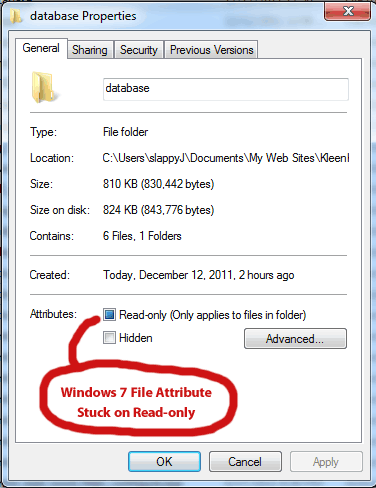 If I try unchecking the Read-only attribute it never stays...when I click OK and then open it up again the Read-only attribute returns. Here is what my database folder looks like (on my host server) through my FTP program FileZilla... 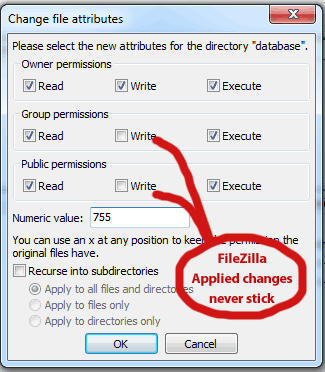 Once again I can try changing permissions but the changes never stick... When I try to perform the upgrade I still get permission errors...  Any help greatly appreciated. |
Posted By: WebWiz-Bruce
Date Posted: 13 December 2011 at 9:37am
|
You can only set permissions via FTP on Linux servers. You would need to get your web host to set the read, write, and modify permissions if you can not do it yourself in a control panel they provide you. ------------- https://www.webwiz.net/web-wiz-forums/forum-hosting.htm" rel="nofollow - Web Wiz Forums Hosting https://www.webwiz.net/web-hosting/windows-web-hosting.htm" rel="nofollow - ASP.NET Web Hosting |
Posted By: slappyJ
Date Posted: 15 December 2011 at 4:10pm
|
From my host: "Unfortunately, since this is a shared environment, we cannot grant you access for schema changes. The only way to change the schema would be that we backup the database, you make the changes on the database, and we upload it back. To download and update your database, you can use DTS/SSIS." Looks like the upgrade is all up to me...what program would I need? what is DTS/SSIS? They made the .bak file available to me but I have no clue what to do with it. |
Posted By: WebWiz-Bruce
Date Posted: 15 December 2011 at 4:42pm
|
Not sure if it is yourself or your host getting the wrong end of the stick, but the permissions have nothing to do with your SQL Server Database. They are file permissions on a folder that happens to be called 'database' as it stores connection settings for the database in ASP files in this folder that need to be written to by the upgrade wizard. Ask your web host to give read, write, and modify folder permissions to your the folder name 'database' in your forums folder root. Once this is done you should be able to upgrade without any problem. ------------- https://www.webwiz.net/web-wiz-forums/forum-hosting.htm" rel="nofollow - Web Wiz Forums Hosting https://www.webwiz.net/web-hosting/windows-web-hosting.htm" rel="nofollow - ASP.NET Web Hosting |
Posted By: slappyJ
Date Posted: 16 December 2011 at 1:59am
|
From my host: as I explained about not having permissions to the database folder on the server... "As a test i logged onto the folder with FTP and uploaded a simple .txt file to the forums/database. It executed properly and once verified i had taken it out. That folder specifically has all access to it and you should be able to modify as you need to. In terms of the access codes though (ie from 755 to 644) those cannot be changed and stay at default for stability of the platform as these are already set and cannot be changed.This is set by the platform for which you are on by the vendor (Windows)." Does this make any sense?Owner Permissions are set to Read, Write and Execute...I should have full access but still get permission errors while trying to run the upgrade. I don't have much hair left as much of it has been pulled out...this is getting ridiculous. |
Posted By: WebWiz-Bruce
Date Posted: 16 December 2011 at 11:39am
|
CHMOD which is used to change permissions via FTP is a UNix command and does not work with Windows IIS. What you see in FileZilla in your image using CHMOD means nothing as FileZilla is not able to read the permissions on the Windows IIS box. Which is also why you can not use FileZilla to set the permissions. CHMOD 755 to 644 are Unix permissions and have nothing to do with Windows IIS. In Windows the server admin has to set, Read, Wite, and Modify permissions on a directory for the IUSR account that the website runs under. This is all quite basic stuff for a web host and that fact that your web host is referring to Unix permissions (access codes though (ie from 755 to 644) those cannot be changed) means that they are completely clueless as to how to run a Windows box. I suspect that this lack of knowledge means you must be using a host is is a reseller for another company. This will also explain why your host is unable to help you. I would suggest that you move web host as the replies they have given clearly show they have a lack of understanding of a Windows Hosting environment and should not be trusted to host a Windows website.
------------- https://www.webwiz.net/web-wiz-forums/forum-hosting.htm" rel="nofollow - Web Wiz Forums Hosting https://www.webwiz.net/web-hosting/windows-web-hosting.htm" rel="nofollow - ASP.NET Web Hosting |
Posted By: slappyJ
Date Posted: 16 December 2011 at 5:12pm
|
Thanks for your continued help Bruce... I actually sent them your last response and immediately got a phone call from my host. It was explained to me that my website is hosted in both a Windows and Unix environment and the tech was obviously confused about that. Folder permissions were changed and I was able to upgrade with no problems so far...although I did notice that my Premium Edition has defaulted back to the free Express Version??? Now when I unlock my forum I get a wall of text followed by a runtime error..... '**************************************************************************************** '** Copyright Notice '** '** Web Wiz Forums(TM) '** http://www.webwizforums.com '** '** Copyright (C)2001-2011 Web Wiz Ltd. All Rights Reserved. '** '** THIS SOFTWARE IS PROVIDED BY THE COPYRIGHT HOLDERS UNDER LICENSE FROM WEB WIZ LTD. '** '** IF YOU DO NOT AGREE TO THE LICENSE AGREEMENT THEN WEB WIZ LTD. IS UNWILLING TO LICENSE '** THE SOFTWARE TO YOU, AND YOU SHOULD DESTROY ALL COPIES YOU HOLD OF 'WEB WIZ' SOFTWARE '** AND DERIVATIVE WORKS IMMEDIATELY. '** '** If you have not received a copy of the license with this work then a copy of the latest '** license contract can be found at:- '** '** http://www.webwiz.net/license '** '** For more information about this software and for licensing information please contact '** 'Web Wiz' at the address and website below:- '** '** Web Wiz Ltd, Unit 10E, Dawkins Road Industrial Estate, Poole, Dorset, BH15 4JD, England '** http://www.webwiz.net '** '** Removal or modification of this copyright notice will violate the license contract. '** '**************************************************************************************** '*************************** SOFTWARE AND CODE MODIFICATIONS **************************** '** '** MODIFICATION OF THE FREE EDITIONS OF THIS SOFTWARE IS A VIOLATION OF THE LICENSE '** AGREEMENT AND IS STRICTLY PROHIBITED '** '** If you wish to modify any part of this software a license must be purchased '** '**************************************************************************************** 'Set the response buffer to true as we maybe redirecting and setting a cookie Response.Buffer = true 'Make sure this page is not cached Response.Expires = -1 Response.ExpiresAbsolute = Now() - 2 Response.AddHeader "pragma","no-cache" Response.AddHeader "cache-control","private" Response.CacheControl = "No-Store" 'Dimension variables Dim sarryForums 'Holds the recordset array for all the categories and forums And this error: Microsoft VBScript runtime error '800a01f4'
Variable is undefined: 'lngTotalRecords' /forum/Default.asp, line 456 |
Posted By: WebWiz-Bruce
Date Posted: 16 December 2011 at 5:28pm
|
Glad to hear that you get there in the end with your host. You will need to apply a version 10 license after you upgrade. I suspect that the issue you have is due to a corrupted file. Try reuploading all the version 10 files again except for those in the 'database' folder and see if that fixes the issue. ------------- https://www.webwiz.net/web-wiz-forums/forum-hosting.htm" rel="nofollow - Web Wiz Forums Hosting https://www.webwiz.net/web-hosting/windows-web-hosting.htm" rel="nofollow - ASP.NET Web Hosting |
Posted By: slappyJ
Date Posted: 16 December 2011 at 6:41pm
|
I have lifetime upgrade protection...I was looking through my old emails and I came across some links that do not work |
Posted By: WebWiz-Bruce
Date Posted: 17 December 2011 at 11:51am
|
You would need to login to your Client Area account in order to locate your registration key. ------------- https://www.webwiz.net/web-wiz-forums/forum-hosting.htm" rel="nofollow - Web Wiz Forums Hosting https://www.webwiz.net/web-hosting/windows-web-hosting.htm" rel="nofollow - ASP.NET Web Hosting |