Extra code being included in posts??
Printed From: Web Wiz Forums
Category: Web Wiz Web App Support Forums
Forum Name: Web Wiz Forums
Forum Description: Support forum for Web Wiz Forums application.
URL: https://forums.webwiz.net/forum_posts.asp?TID=31251
Printed Date: 29 March 2026 at 9:43am
Software Version: Web Wiz Forums 12.08 - https://www.webwizforums.com
Topic: Extra code being included in posts??
Posted By: slappyJ
Subject: Extra code being included in posts??
Date Posted: 20 August 2015 at 5:10pm
|
Recently at the bottom of every new post appears this code below... document.getElementById("linksID").style.display="none" < ="text/" =" https://count.carrierzone.com/app/count_/count.js" rel="nofollow - https://count.carrierzone.com/app/count_/count.js "> What is this and how do I fix it/get rid of it? Thanks, slappyJ |
Replies:
Posted By: WebWiz-Bruce
Date Posted: 21 August 2015 at 8:18am
|
This is being injected in to your web pages usually by a badly behaving browser plugin. ------------- https://www.webwiz.net/web-wiz-forums/forum-hosting.htm" rel="nofollow - Web Wiz Forums Hosting https://www.webwiz.net/web-hosting/windows-web-hosting.htm" rel="nofollow - ASP.NET Web Hosting |
Posted By: slappyJ
Date Posted: 11 January 2016 at 10:00pm
|
Is there a fix for this? People use a variety of browsers today...I myself notice that this kind of posting happens when I use Firefox. |
Posted By: slappyJ
Date Posted: 11 January 2016 at 10:04pm
|
This is what happens when I edit the post in IE browser...all of this extra code appears.... Add code removed by admin <!-- WiredMinds eMetrics tracking with Enterprise Edition V5.4 END --> |
Posted By: rune
Date Posted: 11 January 2016 at 11:20pm
|
From googling it seems to be inserted by some crazy hosting providers : "This code is automatically added by the Analytics program to track the traffic that is coming to the website." http://www.dslreports.com/forum/r28249867-BC-Telus-Hosting-what-is-this-code-on-our-web-pages |
Posted By: WebWiz-Bruce
Date Posted: 12 January 2016 at 8:50am
|
The code that you posted looks to be ad code that is injected in to the page. It may be like rune says that your hosting [provider is injecting ads in to pages which is common with free web hosts. If not then having ads injected in to pages sounds like some type of malware placing ads in pages that you visit. As this type of code is being injected in to pages from another source there is little that can be done. Web Wiz Forums attempts to remove injected code from common plugins but without getting a huge list of every possible injected code and then filtering it it would be impossible to remove all injected code. ------------- https://www.webwiz.net/web-wiz-forums/forum-hosting.htm" rel="nofollow - Web Wiz Forums Hosting https://www.webwiz.net/web-hosting/windows-web-hosting.htm" rel="nofollow - ASP.NET Web Hosting |
Posted By: WebWiz-Bruce
Date Posted: 12 January 2016 at 8:52am
|
Just looked up 'WiredMinds eMetrics tracking' in Bing and it looks to be something that BT inject in to pages. You can disable this by;
------------- https://www.webwiz.net/web-wiz-forums/forum-hosting.htm" rel="nofollow - Web Wiz Forums Hosting https://www.webwiz.net/web-hosting/windows-web-hosting.htm" rel="nofollow - ASP.NET Web Hosting |
 Go to your BT website management pages and access Web Hosting/Analytics/Advanced/Manage Pixel Code/Disable. No idea why it has been enabled.
Posted By: slappyJ
Date Posted: 13 January 2016 at 3:13pm
|
I turned off the Pixel-Code but now whenever somebody posts something this code appears... document.getElementById("linksID").style.display="none" So the problem still exists although not exactly the same as it was before. This was the response from my host: I took some time researching this and it seem like a 3rd party issue to me and not a platform related one.I want to escalate this issue to our admins to see if there's anything they could do but kindly be more specific as to what you want them to do. From the creator of the software,this seem to be from some plugins: " Web Wiz Forums attempts to remove injected code from common plugins but without getting a huge list of every possible injected code and then filtering it it would be impossible to remove all injected code." and suggested that this may be from the hosting company but this is not the case and of course you're not using a free service. He however did not indicate the source of the injected ads: "As this type of code is being injected in to pages from another source there is little that can be done." The only solution from reading his response might be to avoid visiting certain pages: "If not then having ads injected in to pages sounds like some type of malware placing ads in pages that you visit" Again, please let us know how our admins can help as they usually do not provide support for 3rd party software. |
Posted By: WebWiz-Bruce
Date Posted: 14 January 2016 at 9:57am
|
The most likely cause of code injected in to posts is not your web host but browser plugins or internet security software running on your own computer which are placing JavaScript and other code in to web pages. The WYSIWYG Editor works like a web page to allow you to see the format of the post while typing. If you are unable to locate the browser plugin or other software on your computer that is injecting code in to web pages you can disable the WYSIWYG Editor in your forum profile so that you get a standard text area instead in which to type your posts. ------------- https://www.webwiz.net/web-wiz-forums/forum-hosting.htm" rel="nofollow - Web Wiz Forums Hosting https://www.webwiz.net/web-hosting/windows-web-hosting.htm" rel="nofollow - ASP.NET Web Hosting |
Posted By: slappyJ
Date Posted: 15 January 2016 at 3:13am
|
This problem is not isolated to just one computer. What about the majority of users that post to my forum? Their computers are also injecting this extra code. Am I seriously the only one that has complained about this issue? Apparently the version running is 10.11 would an upgrade possibly solve this? |
Posted By: WebWiz-Bruce
Date Posted: 15 January 2016 at 9:08am
|
The issue is not an problem with Web Wiz Forums but something or a number of things that are injecting code in to the pages on your website
A number of reasons have been given for the code being injected which should help you investigate the cause of this issue affecting your forum. If you are unable to find what is injecting the code in to your forum posts then you can disable the WYSIWYG Editor from the forum admin area for all users. In the first post you mention; document.getElementById("linksID").style.display="none" < ="text/" =" https://count.carrierzone.com/app/count_/count.js" rel="nofollow - https://count.carrierzone.com/app/count_/count.js "> This looks to be some type of counter at a guess. Maybe something you have included in your website. Google should help find what this is from. In another post you give; <!-- WiredMinds eMetrics tracking with Enterprise Edition V5.4 END --> I did a search on Google for this for you and found that it pointed to BT analytics's presumably for people who use BT for their ISP. From what I found this can be turned off in their BT account. ------------- https://www.webwiz.net/web-wiz-forums/forum-hosting.htm" rel="nofollow - Web Wiz Forums Hosting https://www.webwiz.net/web-hosting/windows-web-hosting.htm" rel="nofollow - ASP.NET Web Hosting |
Posted By: WebWiz-Bruce
Date Posted: 15 January 2016 at 9:16am
|
I have done some more searching online and looks that both the examples you posted are related to 'WiredMinds eMetrics tracking' A search online for 'WiredMinds eMetrics tracking' found the following post that relates to BT injecting this code in to pages that it's user visit and how to disable it; http://business.forums.bt.com/t5/Website-hosting-domains/WiredMinds-eMetrics-being-added-to-EVERY-page-by-Hostopia-How-to/td-p/75915" rel="nofollow - https://business.forums.bt.com/t5/Website-hosting-domains/WiredMinds-eMetrics-being-added-to-EVERY-page-by-Hostopia-How-to/td-p/75915 ------------- https://www.webwiz.net/web-wiz-forums/forum-hosting.htm" rel="nofollow - Web Wiz Forums Hosting https://www.webwiz.net/web-hosting/windows-web-hosting.htm" rel="nofollow - ASP.NET Web Hosting |
Posted By: slappyJ
Date Posted: 29 January 2016 at 9:38pm
|
Thanks for your help Bruce. I am in the process of upgrading my forum. As I was trying to remember which .asp file contains the database password connection string I came across this... 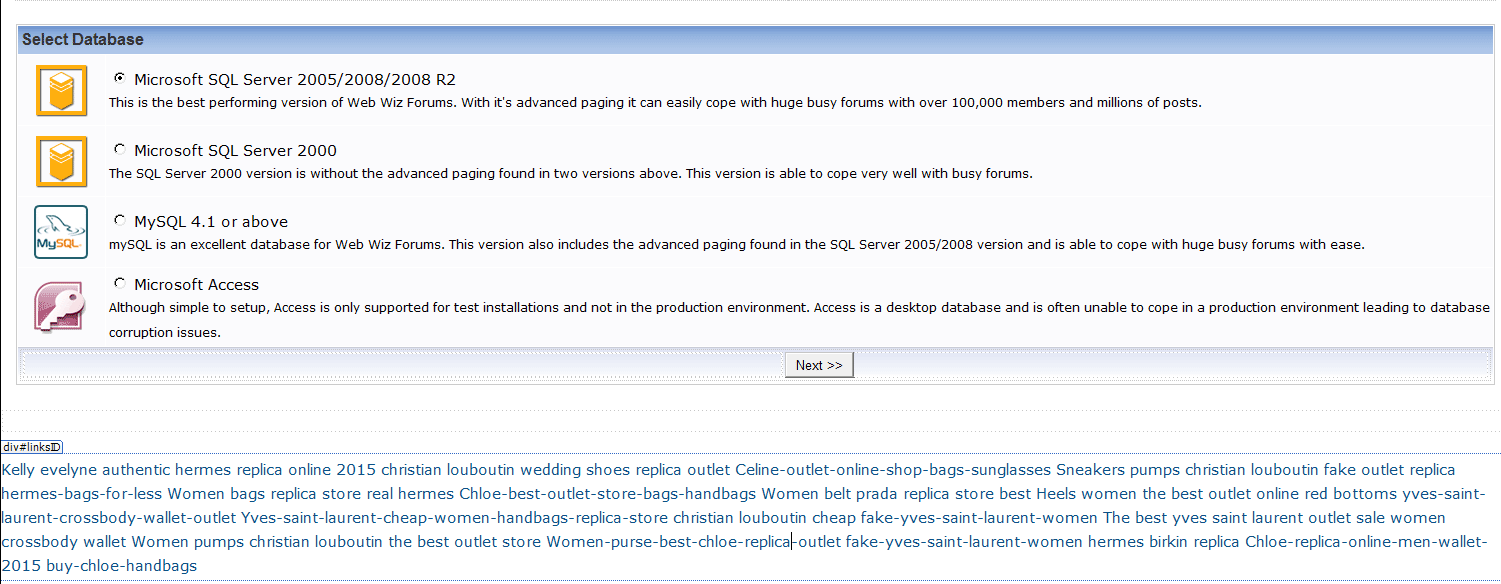 I don't know how many pages this code has infected but I am assuming that an upgrade should fix the problem? It's obvious to me now that the forum was indeed hacked. Which file has the database password? so I can progress with the upgrade. You had said in a previous post: "The most likely cause of code injected in to posts is not your web host but browser plugins or internet security software running on your own computer which are placing JavaScript and other code in to web pages." This problem is not local...other forum users also get this spammy code injected into their posts. The only browser that seem to not inject this code is Internet Explorer...all other browsers Safari, Firefox, Opera etc. seem to have this issue. |
Posted By: WebWiz-Bruce
Date Posted: 01 February 2016 at 9:41am
|
The file that you are looking for is:- database\database_settings.asp Looking at your screen shot there appears to be an ad injected at the bottom of the page which should not be there. Are you sure your web host is not injecting ads in to your web pages. If so then this would likly be the cuase of your injected code issue in posts. What ever the cause the issue is not with web wiz forums but with something injecting the code in to your forum pages and posts. You would need to investigate on an affected system to try and determine what is injecting the code in to your forum pages. ------------- https://www.webwiz.net/web-wiz-forums/forum-hosting.htm" rel="nofollow - Web Wiz Forums Hosting https://www.webwiz.net/web-hosting/windows-web-hosting.htm" rel="nofollow - ASP.NET Web Hosting |
Posted By: slappyJ
Date Posted: 01 February 2016 at 9:59pm
|
I successfully upgraded the forum from version 10 to 11 but when I click on the forum homepage I still get the setup.asp page??? When I hit the login button for the administrator account it also points to the setup.asp page. |
Posted By: WebWiz-Bruce
Date Posted: 02 February 2016 at 7:27am
|
You need to complete the upgrade setup. Once it is completed then the setup.asp page will no longer display. Please see upgrade instructions at the page below; http://www.webwiz.net/web-wiz-forums/kb/" rel="nofollow - https://www.webwiz.net/web-wiz-forums/kb/ You also need to ensure that the database folder is writeable in order that the upgrade complete successfully and the upgrade wizard can write to the folder in order to complete the setup. ------------- https://www.webwiz.net/web-wiz-forums/forum-hosting.htm" rel="nofollow - Web Wiz Forums Hosting https://www.webwiz.net/web-hosting/windows-web-hosting.htm" rel="nofollow - ASP.NET Web Hosting |
Posted By: slappyJ
Date Posted: 02 February 2016 at 6:42pm
|
Must have been some kind of hiccup because the upgrade was successful and it let me log in but then the next page reload went back to the setup.asp file...weird. So anyways I tried the upgrade again and it worked and everything was working fine but now I am getting this error: HTTP Error 500.19 - Internal Server ErrorThe requested page cannot be accessed because the related configuration data for the page is invalid.Seems to be something related to a web.config file problem? |
Posted By: WebWiz-Bruce
Date Posted: 03 February 2016 at 8:09am
|
If you are not using URL Rewriting then remove the web.config file. If you are using URL Rewriting then download a fresh web.config file by downloading the 'Web Wiz Forums URL Rewrite - Friendly URLs (FURLs)' from the page below; http://www.webwiz.net/web-wiz-forums/forum-downloads.htm" rel="nofollow - https://www.webwiz.net/web-wiz-forums/forum-downloads.htm Also make sure you have Microsoft IIS URL Rewrite Module installed on the web server, if not then you can not use URL Rewriting and you should delete the web.config file. ------------- https://www.webwiz.net/web-wiz-forums/forum-hosting.htm" rel="nofollow - Web Wiz Forums Hosting https://www.webwiz.net/web-hosting/windows-web-hosting.htm" rel="nofollow - ASP.NET Web Hosting |
Posted By: slappyJ
Date Posted: 18 February 2016 at 2:59am
Thanks for your help Bruce  After the upgrade the forum still seems to be exhibiting some odd (spammy) behavior. 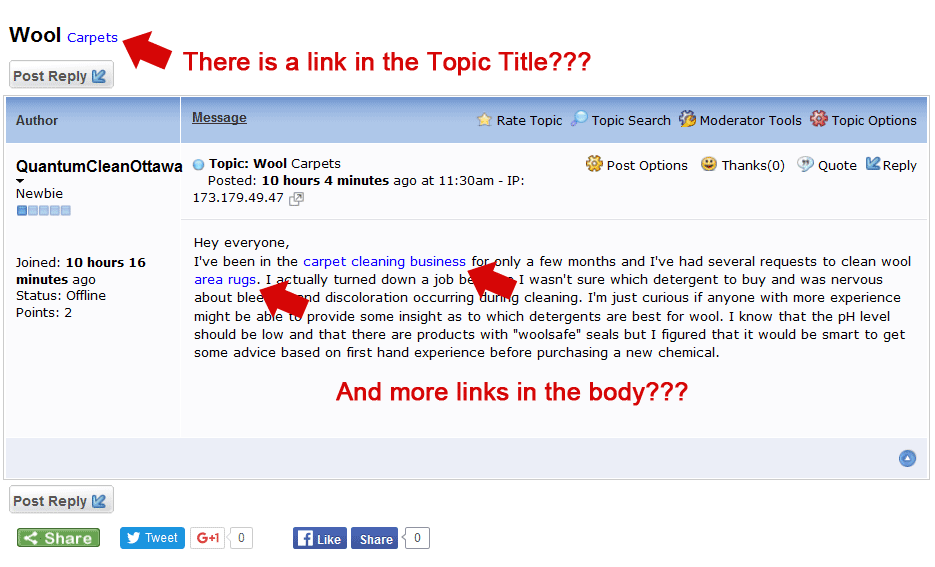 You can find examples on these pages...I am seeing these links randomly appearing in posts (old and new). Sometimes they don't appear and sometimes they do. If I edit the posts using an admin account there is no reference to any links in the edit box. It is not browser specific as I have seen these spam links appear in both Firefox and IE and on more than one computer. http://www.kleenkuip.com/forum/forum_posts.asp?TID=7771&PID=166813&title=wool-carpets#166813" rel="nofollow - http://www.kleenkuip.com/forum/forum_posts.asp?TID=7771&PID=166813&title=wool-carpets#166813 http://www.kleenkuip.com/forum/forum_posts.asp?TID=7766&PID=166811&title=greetings-from-the-caribbean#166811" rel="nofollow - http://www.kleenkuip.com/forum/forum_posts.asp?TID=7766&PID=166811&title=greetings-from-the-caribbean#166811 Wondering why this is all happening after a fresh install. Any ideas? I will also contact my host and look for answers. The last response I got from support was to download all the forum and scan for virus's. All of the old files were wiped before the upgrade. |
Posted By: WebWiz-Bruce
Date Posted: 18 February 2016 at 8:25am
|
If you move your mouse over the links it shows they are VigLink ads. The VigLinks ads are in place to help pay for development of web wiz forums which is now provided for free. If you do not wish to support further development of web wiz forums you can disable the VigLink ads from the Forum Ads page in the admin area. ------------- https://www.webwiz.net/web-wiz-forums/forum-hosting.htm" rel="nofollow - Web Wiz Forums Hosting https://www.webwiz.net/web-hosting/windows-web-hosting.htm" rel="nofollow - ASP.NET Web Hosting |