| Author |
 Topic Search Topic Search  Topic Options Topic Options
|
RCorr 
Groupie

Joined: 21 January 2003
Status: Offline
Points: 126
|
 Post Options Post Options
 Thanks(0) Thanks(0)
 Quote Quote  Reply Reply
 Topic: Visual Studio 2008 Standard Topic: Visual Studio 2008 Standard
Posted: 22 May 2008 at 7:14pm |
Hello,
My work was given a copy of Visual Studio 2008 Standard edition from one of our
partners. I am a novice to this application. Therefore I am going
through some online tutorials to get myself familiar with it.
After going through some tutorials this is what I know about the application to
date:
* some of the projects you can create are windows applications and Server
controls
I also came across a tutorial for Visual Web Developer 2008 Express
Edition. Even though the two have similar interfaces, Visual Web Developer
2008 Express Edition allows users to create web sites.
I would like to know if one can create web sites using Visual Studio 2008
Standard edition. I haven't come across anything yet.
Maybe I have stumbled upon an entirely different application for entirely
different version and building/maintaining web sites is not an option in Visual
Studio 2008 Standard edition.
Do I have this right? A clarification would be appreciated.
RCorr
|
 |
michael
Senior Member


Joined: 08 April 2002
Location: United States
Status: Offline
Points: 4670
|
Post Options
Thanks(0)
Quote Reply
Posted: 23 May 2008 at 2:30am |
|
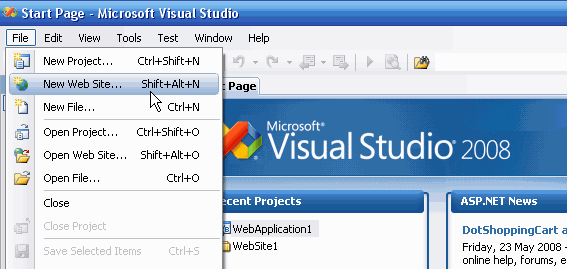
Yes you can. Click on File>New Project for Windows Apps etc and on File>New Website for a website
|
|
|
|
jamie.townsend
Groupie
Joined: 07 December 2007
Location: England
Status: Offline
Points: 114
|
Post Options
Thanks(0)
Quote Reply
Posted: 23 May 2008 at 2:18pm |
|
I will be migrating to 2008 soon as the action pack has been sat in the cuboard for awhile waiting to be installed.
Let me know how you get on RCorr
|
|
WebWiz-Bruce
Admin Group


Web Wiz Developer
Joined: 03 September 2001
Location: Bournemouth
Status: Offline
Points: 9844
|
Post Options
Thanks(0)
Quote Reply
Posted: 23 May 2008 at 2:24pm |
|
Is Visual Studio 2008 included with the Action Pack?
I thought you only got Visual Studio 2008 with the more expensive MSDN subscription and you only got sent the free Express Edition with the Action Pack subscription.
|
|
|
|
jamie.townsend
Groupie
Joined: 07 December 2007
Location: England
Status: Offline
Points: 114
|
Post Options
Thanks(0)
Quote Reply
Posted: 23 May 2008 at 2:46pm |
|
Good point !!
I just had a quick look and couldn't even find the free 2008 version.
The only reason I mentioned it was because my boss said we had it previously so I just assumed it was with the action pack.
|
|
WebWiz-Bruce
Admin Group
Web Wiz Developer
Joined: 03 September 2001
Location: Bournemouth
Status: Offline
Points: 9844
|
Post Options
Thanks(0)
Quote Reply
Posted: 23 May 2008 at 3:00pm |
|
The action pack is more designed for business that sale MS software. It's the MSDN subscription that's aimed at developers but costs 4 to 5 times as much as the Action Pack subscription.
As my company already pay Microsoft around £5,000 a year for their overly expensive Service Providers Licensing as well as the Action Pack Subscription I refuse to pay them even more money by subscribing to MSDN, which I believe is currently around £1,000 a year. Obviously as with all other of Microsoft's software if you are in the US you would get this around 40% less!!
Which brings me to another point, if we have to pay more in the UK for Microsoft licensing because they claim they need to produce special versions for Europe then how come all their software tries to install with the US default. If we have to pay more then shouldn't they supply a UK installation disk!
|
|
|
|
RCorr
Groupie
Joined: 21 January 2003
Status: Offline
Points: 126
|
Post Options
Thanks(0)
Quote Reply
Posted: 23 May 2008 at 3:06pm |
Michael,
My query sounds so simple..yet I still can't seem to find the option to
create a web site in Visual Studio 2008. Below are screen shots of the
options available to me.
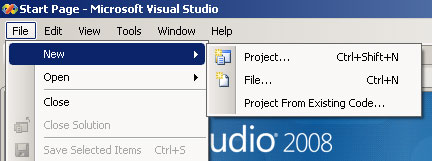
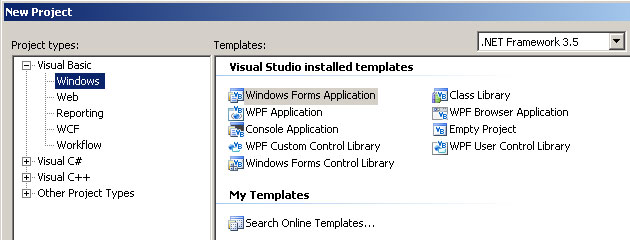
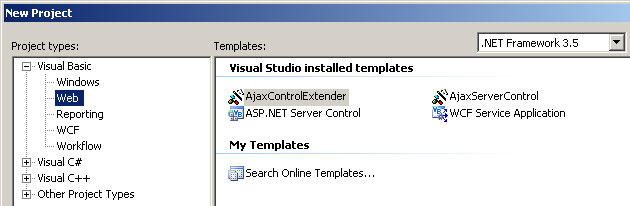
The options for Visual C# and C are the same as Visual Basic. As you see there "New web site" option doesn't exist for me. I could try reinstalling Visual Studio.... Cheers, RCorr
|
|
iSec
Senior Member

Joined: 13 February 2005
Status: Offline
Points: 1140
|
Post Options
Thanks(0)
Quote Reply
Posted: 24 May 2008 at 6:47am |
RCorr,
- It's File -> New Website (not New Project)
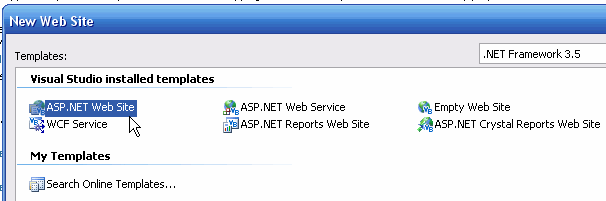
- Now Select: ASP.NET website
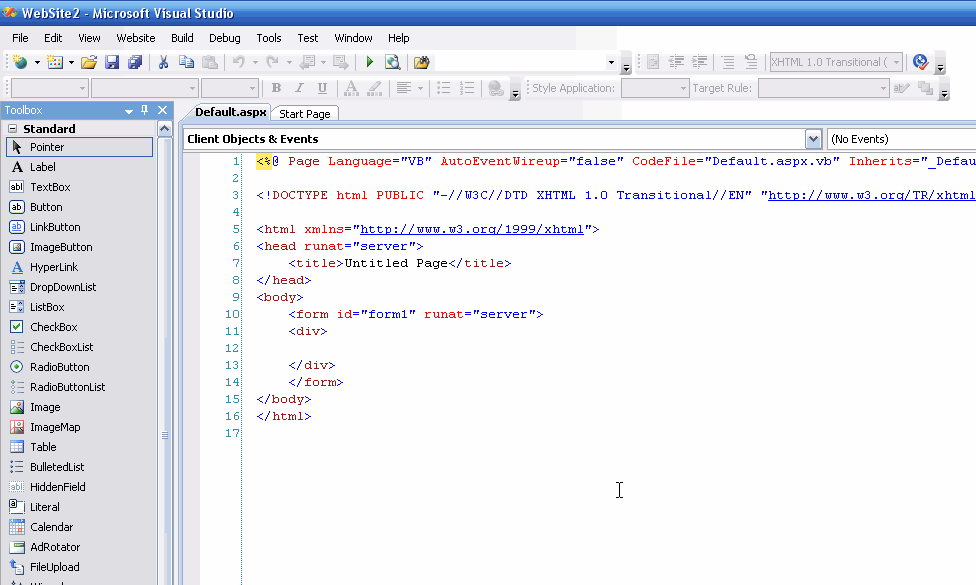
- Now you should see something like this:
Hope that helps!
|
|
"When it gets dark enough, you can see the stars"
-Charles A. Beard
|
|