Web Wiz - Green Windows Web Hosting

  New Posts New Posts RSS Feed - Extra code being included in posts??
  FAQ FAQ  Forum Search   Events   Register Register  Login Login

Extra code being included in posts??

 Post Reply Post Reply Page  <123>
Author
WebWiz-Bruce View Drop Down
Admin Group
Admin Group
Avatar
Web Wiz Developer

Joined: 03 September 2001
Location: Bournemouth
Status: Offline
Points: 9844
Post Options Post Options   Thanks (0) Thanks(0)   Quote WebWiz-Bruce Quote  Post ReplyReply Direct Link To This Post Posted: 14 January 2016 at 9:57am
The most likely cause of code injected in to posts is not your web host but browser plugins or internet security software running on your own computer which are placing JavaScript and other code in to web pages.

The WYSIWYG Editor works like a web page to allow you to see the format of the post while typing.

If you are unable to locate the browser plugin or other software on your computer that is injecting code in to web pages you can disable the WYSIWYG Editor in your forum profile so that you get a standard text area instead in which to type your posts.
Back to Top
slappyJ View Drop Down
Groupie
Groupie
Avatar

Joined: 28 January 2004
Status: Offline
Points: 178
Post Options Post Options   Thanks (0) Thanks(0)   Quote slappyJ Quote  Post ReplyReply Direct Link To This Post Posted: 15 January 2016 at 3:13am
This problem is not isolated to just one computer. What about the majority of users that post to my forum? Their computers are also injecting this extra code.

Am I seriously the only one that has complained about this issue?

Apparently the version running is 10.11 would an upgrade possibly solve this?


Edited by slappyJ - 15 January 2016 at 3:31am
Back to Top
WebWiz-Bruce View Drop Down
Admin Group
Admin Group
Avatar
Web Wiz Developer

Joined: 03 September 2001
Location: Bournemouth
Status: Offline
Points: 9844
Post Options Post Options   Thanks (0) Thanks(0)   Quote WebWiz-Bruce Quote  Post ReplyReply Direct Link To This Post Posted: 15 January 2016 at 9:08am
The issue is not an problem with Web Wiz Forums but something or a number of things that are  injecting code in to the pages on your website

A number of reasons have been given for the code being injected which should help you investigate the cause of this issue affecting your forum.

If you are unable to find what is injecting the code in to your forum posts then you can disable the WYSIWYG Editor from the forum admin area for all users.

In the first post you mention;

document.getElementById("linksID").style.display="none" < ="text/" ="https://count.carrierzone.com/app/count_/count.js">

This looks to be some type of counter at a guess. Maybe something you have included in your website. Google should help find what this is from.

In another post you give;

<!-- WiredMinds eMetrics tracking with Enterprise Edition V5.4 END -->

I did a search on Google for this for you and found that it pointed to BT analytics's presumably for people who use BT for their ISP. From what I found this can be turned off in their BT account. 
Back to Top
WebWiz-Bruce View Drop Down
Admin Group
Admin Group
Avatar
Web Wiz Developer

Joined: 03 September 2001
Location: Bournemouth
Status: Offline
Points: 9844
Post Options Post Options   Thanks (0) Thanks(0)   Quote WebWiz-Bruce Quote  Post ReplyReply Direct Link To This Post Posted: 15 January 2016 at 9:16am
I have done some more searching online and looks that both the examples you posted are related to 'WiredMinds eMetrics tracking'

A search online for 'WiredMinds eMetrics tracking' found the following post that relates to BT injecting this code in to pages that it's user visit and how to disable it;

https://business.forums.bt.com/t5/Website-hosting-domains/WiredMinds-eMetrics-being-added-to-EVERY-page-by-Hostopia-How-to/td-p/75915
Back to Top
slappyJ View Drop Down
Groupie
Groupie
Avatar

Joined: 28 January 2004
Status: Offline
Points: 178
Post Options Post Options   Thanks (0) Thanks(0)   Quote slappyJ Quote  Post ReplyReply Direct Link To This Post Posted: 29 January 2016 at 9:38pm
Thanks for your help Bruce.

I am in the process of upgrading my forum. As I was trying to remember which .asp file contains the database password connection string I came across this...
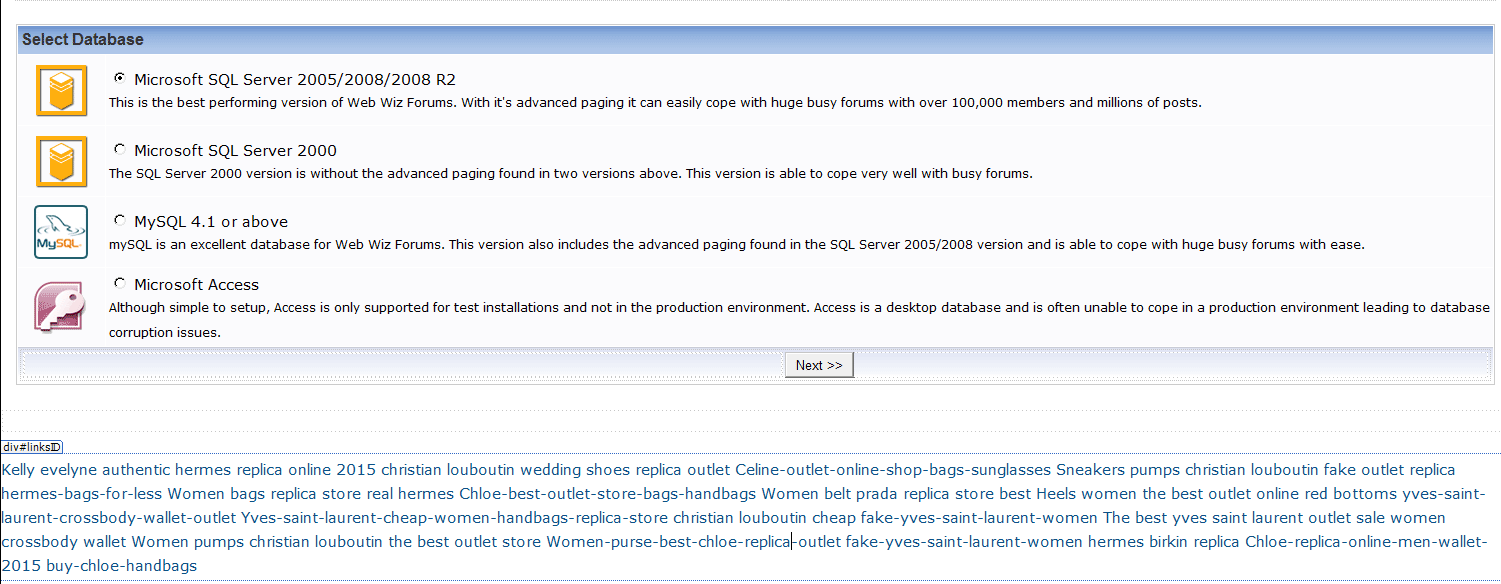


I don't know how many pages this code has infected but I am assuming that an upgrade should fix the problem? It's obvious to me now that the forum was indeed hacked.

Which file has the database password? so I can progress with the upgrade.

You had said in a previous post: "The most likely cause of code injected in to posts is not your web host but browser plugins or internet security software running on your own computer which are placing JavaScript and other code in to web pages."

This problem is not local...other forum users also get this spammy code injected into their posts. The only browser that seem to not inject this code is Internet Explorer...all other browsers Safari, Firefox, Opera etc. seem to have this issue.


Edited by slappyJ - 29 January 2016 at 10:00pm

Back to Top
WebWiz-Bruce View Drop Down
Admin Group
Admin Group
Avatar
Web Wiz Developer

Joined: 03 September 2001
Location: Bournemouth
Status: Offline
Points: 9844
Post Options Post Options   Thanks (0) Thanks(0)   Quote WebWiz-Bruce Quote  Post ReplyReply Direct Link To This Post Posted: 01 February 2016 at 9:41am
The file that you are looking for is:-

database\database_settings.asp

Looking at your screen shot there appears to be an ad injected at the bottom of the page which should not be there.

Are you sure your web host is not injecting ads in to your web pages. If so then this would likly be the cuase of your injected code issue in posts.

What ever the cause the issue is not with web wiz forums but with something injecting the code in to your forum pages and posts.

You would need to investigate on an affected system to try and determine what is injecting the code in to your forum pages.
Back to Top
slappyJ View Drop Down
Groupie
Groupie
Avatar

Joined: 28 January 2004
Status: Offline
Points: 178
Post Options Post Options   Thanks (0) Thanks(0)   Quote slappyJ Quote  Post ReplyReply Direct Link To This Post Posted: 01 February 2016 at 9:59pm
I successfully upgraded the forum from version 10 to 11 but when I click on the forum homepage I still get the setup.asp page???

When I hit the login button for the administrator account it also points to the setup.asp page.


Edited by slappyJ - 01 February 2016 at 10:13pm
Back to Top
WebWiz-Bruce View Drop Down
Admin Group
Admin Group
Avatar
Web Wiz Developer

Joined: 03 September 2001
Location: Bournemouth
Status: Offline
Points: 9844
Post Options Post Options   Thanks (0) Thanks(0)   Quote WebWiz-Bruce Quote  Post ReplyReply Direct Link To This Post Posted: 02 February 2016 at 7:27am
You need to complete the upgrade setup. Once it is completed then the setup.asp page will no longer display.

Please see upgrade instructions at the page below;

https://www.webwiz.net/web-wiz-forums/kb/

You also need to ensure that the database folder is writeable in order that the upgrade complete successfully and the upgrade wizard can write to the folder in order to complete the setup.
Back to Top
 Post Reply Post Reply Page  <123>

Forum Jump Forum Permissions View Drop Down

Forum Software by Web Wiz Forums® version 12.08
Copyright ©2001-2026 Web Wiz Ltd.


Become a Fan on Facebook Follow us on X Connect with us on LinkedIn Web Wiz Blogs
About Web Wiz | Contact Web Wiz | Terms & Conditions | Cookies | Privacy Notice

Web Wiz is the trading name of Web Wiz Ltd. Company registration No. 05977755. Registered in England and Wales.
Registered office: Web Wiz Ltd, Unit 18, The Glenmore Centre, Fancy Road, Poole, Dorset, BH12 4FB, UK.

Prices exclude VAT at 20% unless otherwise stated. VAT No. GB988999105 - $, € prices shown as a guideline only.

Copyright ©2001-2026 Web Wiz Ltd. All rights reserved.