Web Wiz - Green Windows Web Hosting

  New Posts New Posts RSS Feed - Issues with Google Chrome
  FAQ FAQ  Forum Search   Events   Register Register  Login Login

Issues with Google Chrome

 Post Reply Post Reply Page  12>
Author
 Rating: Topic Rating: 2 Votes, Average 4.50  Topic Search Topic Search  Topic Options Topic Options
SteveCorder View Drop Down
Newbie
Newbie


Joined: 12 March 2009
Status: Offline
Points: 6
Post Options Post Options   Thanks (0) Thanks(0)   Quote SteveCorder Quote  Post ReplyReply Direct Link To This Post Topic: Issues with Google Chrome
    Posted: 12 March 2009 at 1:45pm
I'm a long time user of WWF, and am planning an upgrade to 9.x. I have been testing the latest version locally, and have a recurring issue with Google Chrome (I've noticed this on several of your other applications too):


Is there a way of solving the form height issue? I presume that it's because of Chrome having the address at the top of the form, and I'm sure it's a pretty simple fix.

Thanks in advance,
Steve
Back to Top
WebWiz-Bruce View Drop Down
Admin Group
Admin Group
Avatar
Web Wiz Developer

Joined: 03 September 2001
Location: Bournemouth
Status: Offline
Points: 9844
Post Options Post Options   Thanks (0) Thanks(0)   Quote WebWiz-Bruce Quote  Post ReplyReply Direct Link To This Post Posted: 12 March 2009 at 2:26pm
Google Chrome uses Apples Safari rendering engine.

Web Wiz Forums has been tested in both Apple Safari and Google Chrome and can not find the issue you mention. In tests here there is quite a space between the button and the bottom of the window.

Your screen shot does not display the top of the window so not sure if you have some plugin which sits at the top of your browser window, but having the address bar at the top should not make a difference.
Back to Top
SteveCorder View Drop Down
Newbie
Newbie


Joined: 12 March 2009
Status: Offline
Points: 6
Post Options Post Options   Thanks (0) Thanks(0)   Quote SteveCorder Quote  Post ReplyReply Direct Link To This Post Posted: 23 March 2009 at 10:15am

Image Popup on Google Chrome:


Image Popup on Safari:


Chrome may be using the Safari engine, but as you can see - there are differences and a height issue. I also get the error message: "Error inserting object in current location" on both these browsers.
 
cheers,
Steve
Back to Top
SteveCorder View Drop Down
Newbie
Newbie


Joined: 12 March 2009
Status: Offline
Points: 6
Post Options Post Options   Thanks (0) Thanks(0)   Quote SteveCorder Quote  Post ReplyReply Direct Link To This Post Posted: 23 March 2009 at 10:16am
By the way - the above screenshots are from replying to this post.
Back to Top
WebWiz-Bruce View Drop Down
Admin Group
Admin Group
Avatar
Web Wiz Developer

Joined: 03 September 2001
Location: Bournemouth
Status: Offline
Points: 9844
Post Options Post Options   Thanks (0) Thanks(0)   Quote WebWiz-Bruce Quote  Post ReplyReply Direct Link To This Post Posted: 23 March 2009 at 2:53pm
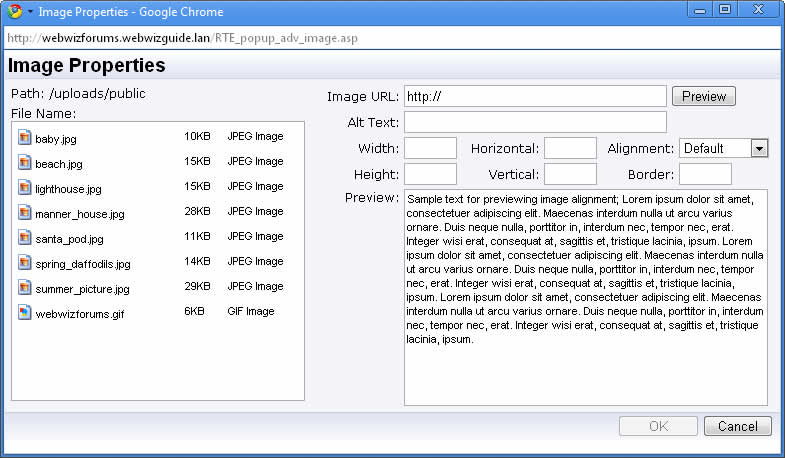
Have tested again and still can not find the problem you are seeing. Having the address bar at the top should make no difference as other browsers like Firefox do this also.

Here is a screen shot from Google Chrome:-


If you get the error message about inserting the object then it means that you did not have the cursor in a location where an image can be inserted when you clicked the insert image button and it therefore gives you an error saying that the image can not be inserted in that location.


Edited by WebWiz-Bruce - 23 March 2009 at 2:56pm
Back to Top
MadDog View Drop Down
Mod Builder Group
Mod Builder Group
Avatar

Joined: 01 January 2002
Status: Offline
Points: 3008
Post Options Post Options   Thanks (0) Thanks(0)   Quote MadDog Quote  Post ReplyReply Direct Link To This Post Posted: 23 March 2009 at 10:08pm
Fonts look different between the screen shots... that might cause the difference...
Back to Top
WebWiz-Bruce View Drop Down
Admin Group
Admin Group
Avatar
Web Wiz Developer

Joined: 03 September 2001
Location: Bournemouth
Status: Offline
Points: 9844
Post Options Post Options   Thanks (0) Thanks(0)   Quote WebWiz-Bruce Quote  Post ReplyReply Direct Link To This Post Posted: 24 March 2009 at 8:11am
Same fonts and the same sizes just that one is using 'Clear Type' that is meant to make fonts easier to read, but just make it harder.

Looking at both screen shots the window in SteveCorder's post is allot smaller. There was an update a few releases ago that increased the window size of the the 'Insert Image' window.

Steve it maybe worth checking that you have updated all the files in your installation to the latest version, especially the includes/RTE_toolbar_inc.asp file.
Back to Top
SteveCorder View Drop Down
Newbie
Newbie


Joined: 12 March 2009
Status: Offline
Points: 6
Post Options Post Options   Thanks (0) Thanks(0)   Quote SteveCorder Quote  Post ReplyReply Direct Link To This Post Posted: 06 April 2009 at 6:20am
Could this be a Windows Vista thing?
Back to Top
 Post Reply Post Reply Page  12>

Forum Jump Forum Permissions View Drop Down

Forum Software by Web Wiz Forums® version 12.08
Copyright ©2001-2026 Web Wiz Ltd.


Become a Fan on Facebook Follow us on X Connect with us on LinkedIn Web Wiz Blogs
About Web Wiz | Contact Web Wiz | Terms & Conditions | Cookies | Privacy Notice

Web Wiz is the trading name of Web Wiz Ltd. Company registration No. 05977755. Registered in England and Wales.
Registered office: Web Wiz Ltd, Unit 18, The Glenmore Centre, Fancy Road, Poole, Dorset, BH12 4FB, UK.

Prices exclude VAT at 20% unless otherwise stated. VAT No. GB988999105 - $, € prices shown as a guideline only.

Copyright ©2001-2026 Web Wiz Ltd. All rights reserved.