Web Wiz - Green Windows Web Hosting

  New Posts New Posts RSS Feed - Needs Help With Fixing Picture
  FAQ FAQ  Forum Search   Events   Register Register  Login Login

Topic ClosedNeeds Help With Fixing Picture

 Post Reply Post Reply Page  12>
Author
Misty View Drop Down
Senior Member
Senior Member
Avatar

Joined: 06 February 2002
Location: United States
Status: Offline
Points: 711
Direct Link To This Post Topic: Needs Help With Fixing Picture
    Posted: 02 May 2005 at 10:18pm
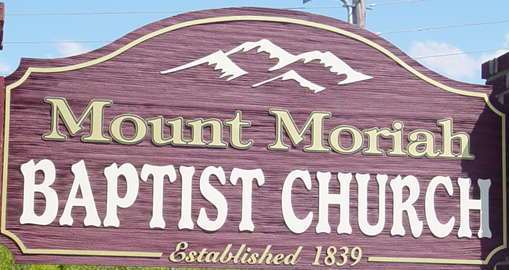
I use Fireworks, but I cannot figure out how to crop the following picture:
 
 
I want to crop the grass out of the picture. I also want to crop out the blue sky and the electrical wires out of this piccture. How do I remove the shadow from the end of the sign?
Back to Top
Gullanian View Drop Down
Senior Member
Senior Member
Avatar

Joined: 04 January 2002
Location: England
Status: Offline
Points: 4373
Direct Link To This Post Posted: 03 May 2005 at 12:21am
For cropping, just click on crop, click and drag the area you want to KEEP, release the mouse button and hit enter.
Back to Top
Misty View Drop Down
Senior Member
Senior Member
Avatar

Joined: 06 February 2002
Location: United States
Status: Offline
Points: 711
Direct Link To This Post Posted: 03 May 2005 at 2:22am
Cropping doesn't really help. The sign is uneven. I also would like to know how to remove the shadow from the side of the sign.
Back to Top
Mart View Drop Down
Senior Member
Senior Member
Avatar

Joined: 30 November 2002
Status: Offline
Points: 2304
Direct Link To This Post Posted: 03 May 2005 at 2:46am
Not sure about fireworks but in photoshop there is a lasso tool, use the polygonal one. Just click around the border of the sign and when you reach the other side the sign will be selected. Then go to Edit > Copy Merged create a new document (the size will be automatically generated) with a transparent background, press enter and your done.
Back to Top
Mart View Drop Down
Senior Member
Senior Member
Avatar

Joined: 30 November 2002
Status: Offline
Points: 2304
Direct Link To This Post Posted: 03 May 2005 at 3:00am


Now you just have the rotate it a little and sort out the shadow
Back to Top
michael View Drop Down
Senior Member
Senior Member
Avatar

Joined: 08 April 2002
Location: United States
Status: Offline
Points: 4670
Direct Link To This Post Posted: 03 May 2005 at 9:38am
With the shadow you may have to use a copy brush on the reds and do pixel work on the letters. I don't think any filter is smart enough to do it right as you want it.
Back to Top
Mart View Drop Down
Senior Member
Senior Member
Avatar

Joined: 30 November 2002
Status: Offline
Points: 2304
Direct Link To This Post Posted: 03 May 2005 at 11:21am
To be honest I think you should take the picture again, it is wonky, has a shadow and some of the sign is cut off
Back to Top
Gullanian View Drop Down
Senior Member
Senior Member
Avatar

Joined: 04 January 2002
Location: England
Status: Offline
Points: 4373
Direct Link To This Post Posted: 03 May 2005 at 11:52am
You could probably draw that sign fairly easily, wouldn't look photo realistic but it only compromises of a few elements.
Back to Top
 Post Reply Post Reply Page  12>

Forum Jump Forum Permissions View Drop Down

Forum Software by Web Wiz Forums® version 12.08
Copyright ©2001-2026 Web Wiz Ltd.


Become a Fan on Facebook Follow us on X Connect with us on LinkedIn Web Wiz Blogs
About Web Wiz | Contact Web Wiz | Terms & Conditions | Cookies | Privacy Notice

Web Wiz is the trading name of Web Wiz Ltd. Company registration No. 05977755. Registered in England and Wales.
Registered office: Web Wiz Ltd, Unit 18, The Glenmore Centre, Fancy Road, Poole, Dorset, BH12 4FB, UK.

Prices exclude VAT at 20% unless otherwise stated. VAT No. GB988999105 - $, € prices shown as a guideline only.

Copyright ©2001-2026 Web Wiz Ltd. All rights reserved.