Web Wiz - Green Windows Web Hosting

  New Posts New Posts RSS Feed - wwf SQL database size
  FAQ FAQ  Forum Search   Events   Register Register  Login Login

wwf SQL database size

 Post Reply Post Reply Page  <12
Author
Nick-V View Drop Down
Senior Member
Senior Member


Joined: 26 October 2002
Location: United Kingdom
Status: Offline
Points: 319
Post Options Post Options   Thanks (0) Thanks(0)   Quote Nick-V Quote  Post ReplyReply Direct Link To This Post Posted: 21 September 2007 at 1:32am
If you are using differential backups I wonder when was the last full backup was done. Is this helpful:
 
The size of a differential backup depends on the amount of data that has changed since the base. Generally, the older a base is, the larger a new differential backup will be. A specific differential backup captures the state of changed extents at that time that backup is created. If you create a series of differential backups, a frequently updated extent is likely to contain different data in each differential. As the differential backups increase in size, restoring a differential backup can significantly increase the time that is required to restore a database. Therefore, we recommend that you take a new full backup at set intervals to establish a new differential base for the data. For example, you might take a weekly full backup of the whole database (that is, a full database backup) followed by a regular series of differential database backups during the week.
Back to Top
iSec View Drop Down
Senior Member
Senior Member
Avatar

Joined: 13 February 2005
Status: Offline
Points: 1140
Post Options Post Options   Thanks (0) Thanks(0)   Quote iSec Quote  Post ReplyReply Direct Link To This Post Posted: 21 September 2007 at 2:00am
Hello Nick,

that was a bit confusing... I guess I should just stick to the daily FULL backup...unless there is a better way of doing it.
"When it gets dark enough, you can see the stars"
-Charles A. Beard
Back to Top
Nick-V View Drop Down
Senior Member
Senior Member


Joined: 26 October 2002
Location: United Kingdom
Status: Offline
Points: 319
Post Options Post Options   Thanks (0) Thanks(0)   Quote Nick-V Quote  Post ReplyReply Direct Link To This Post Posted: 21 September 2007 at 8:48am
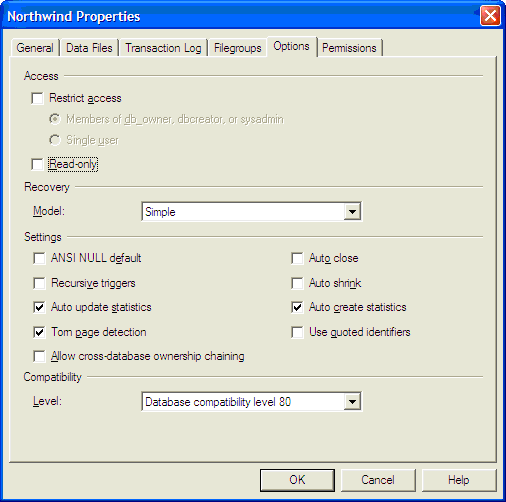
You might want to try out a full recovery model (I use it). Take a full backup once a week and take transaction log backups every day (or every hour if you wish). I think this is what you were aiming for. With this model you can restore to any point in time. It will use the the full backup and add the transactions up to a specific minute so you must keep the files that make up a set.
 
An alternative is a simple model with a full backup of the database every day (or whatever). Of course with this you could lose up to 99% of a day's work - you can only restore to the last available backup. You must keep one file only.
 
You can still do it using differentials but remember they hold all changes since the last full backup and not since the last differential backup (like the transactions option). Therefore you only need the last full and one differential (not all transaction files). Because they are bigger files they take longer than transaction backups. You must keep the full backup and latest differential.
 
It really depends how critical your use is, how frequently changes are made, if you wish to protect against database failure or user error too (deleting whole threads!). Option 1 is good but all sorts of other things can screw up your server too so think about these too.
 
Always keep more than one full backup generation in case a backup set fails! Keep backups off-site...fire and thieves, etc can kill your database AND your backups!
 
Good luck.


Edited by Nick-V - 21 September 2007 at 8:53am

Back to Top
iSec View Drop Down
Senior Member
Senior Member
Avatar

Joined: 13 February 2005
Status: Offline
Points: 1140
Post Options Post Options   Thanks (0) Thanks(0)   Quote iSec Quote  Post ReplyReply Direct Link To This Post Posted: 21 September 2007 at 10:28pm
Hello Nick,

this sounds good... I see the full recover model can be done from the db properties as shown below, but where would the backup be stored on the server?


"When it gets dark enough, you can see the stars"
-Charles A. Beard
Back to Top
Nick-V View Drop Down
Senior Member
Senior Member


Joined: 26 October 2002
Location: United Kingdom
Status: Offline
Points: 319
Post Options Post Options   Thanks (0) Thanks(0)   Quote Nick-V Quote  Post ReplyReply Direct Link To This Post Posted: 21 September 2007 at 11:06pm
Where ever you want it stored...normally under C:\Program Files\Microsoft SQL Server\MSSQL\BACKUP and optionally a sub folder for each database.
 
Setting to Full does not actually make the backups occur. You need to schedule the backups using jobs and maintenance facilities (can't remember sql 2000) but read the help.


Edited by Nick-V - 21 September 2007 at 11:07pm
Back to Top
 Post Reply Post Reply Page  <12

Forum Jump Forum Permissions View Drop Down

Forum Software by Web Wiz Forums® version 12.08
Copyright ©2001-2026 Web Wiz Ltd.


Become a Fan on Facebook Follow us on X Connect with us on LinkedIn Web Wiz Blogs
About Web Wiz | Contact Web Wiz | Terms & Conditions | Cookies | Privacy Notice

Web Wiz is the trading name of Web Wiz Ltd. Company registration No. 05977755. Registered in England and Wales.
Registered office: Web Wiz Ltd, Unit 18, The Glenmore Centre, Fancy Road, Poole, Dorset, BH12 4FB, UK.

Prices exclude VAT at 20% unless otherwise stated. VAT No. GB988999105 - $, € prices shown as a guideline only.

Copyright ©2001-2026 Web Wiz Ltd. All rights reserved.