Web Wiz - Green Windows Web Hosting

  New Posts New Posts RSS Feed - Needs Help With Fixing Picture
  FAQ FAQ  Forum Search   Events   Register Register  Login Login

Topic ClosedNeeds Help With Fixing Picture

 Post Reply Post Reply Page  <12
Author
xeerex View Drop Down
Senior Member
Senior Member


Joined: 19 November 2002
Location: United States
Status: Offline
Points: 601
Direct Link To This Post Posted: 03 May 2005 at 12:11pm
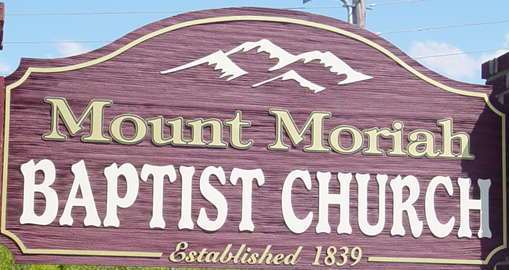
I use Fireworks quite extensively and participate at www.geekforum.com as well (fireworks site). Straightening the picture is trivial; however, removing the shadows (realistically) will be a pita. I agree with Mart that you should retake the picture.

Note: Rather than use the lasso tool which generally leaves a "crisp" edge, you should try using the eraser tool with a softer edge.

Better suggestion: Draw the sign as a vector in FW. Then you can do with it as you wish.Wink
Back to Top
Gullanian View Drop Down
Senior Member
Senior Member
Avatar

Joined: 04 January 2002
Location: England
Status: Offline
Points: 4373
Direct Link To This Post Posted: 03 May 2005 at 12:25pm
Would removing shadow really be that hard?  You could cut and paste segments over the shadow from other parts of the sign, I've done it before, if your careful it's pretty much unoticable.
Back to Top
xeerex View Drop Down
Senior Member
Senior Member


Joined: 19 November 2002
Location: United States
Status: Offline
Points: 601
Direct Link To This Post Posted: 03 May 2005 at 12:49pm
Originally posted by wrote:

Would removing shadow really be that hard?  You could cut and paste segments over the shadow from other parts of the sign, I've done it before, if your careful it's pretty much unoticable.


If you were careful and used some blurring it can definitely be done, especially it will only be used for web graphics. However, the pic is skewed slightly and that makes it more of a pita IMHO.

Here is a quick one I did in FW as a vector. I know its not perfect and the fonts aren't dead ringers, but its a freebie. It will at least get it going.Wink


New One as drawn in FW:


Original In Post:


And to show the power of the vector, here it is in a larger scale:

http://www.rexpage.com/images/Sign_MountMoriah_LG.gif

Link To FW png Source at 150dpi:
http://www.rexpage.com/images/MountMoriah_ChruchSign.png


Edited by xeerex - 03 May 2005 at 12:52pm
Back to Top
Misty View Drop Down
Senior Member
Senior Member
Avatar

Joined: 06 February 2002
Location: United States
Status: Offline
Points: 711
Direct Link To This Post Posted: 04 May 2005 at 2:52am
Xeerex,
 
Thank you for modifying the picture! It looks good. 
Back to Top
xeerex View Drop Down
Senior Member
Senior Member


Joined: 19 November 2002
Location: United States
Status: Offline
Points: 601
Direct Link To This Post Posted: 04 May 2005 at 10:45am
Originally posted by misty misty wrote:

Thank you for modifying the picture! It looks good.


No problem at all.

It is drawn as an "all vector" in FireWorks. You can download the source PNG from the link above and open it right up in FW with layers, etc. I didn't use any special filters, but you may/may not need to substitue fonts.
Back to Top
 Post Reply Post Reply Page  <12

Forum Jump Forum Permissions View Drop Down

Forum Software by Web Wiz Forums® version 12.08
Copyright ©2001-2026 Web Wiz Ltd.


Become a Fan on Facebook Follow us on X Connect with us on LinkedIn Web Wiz Blogs
About Web Wiz | Contact Web Wiz | Terms & Conditions | Cookies | Privacy Notice

Web Wiz is the trading name of Web Wiz Ltd. Company registration No. 05977755. Registered in England and Wales.
Registered office: Web Wiz Ltd, Unit 18, The Glenmore Centre, Fancy Road, Poole, Dorset, BH12 4FB, UK.

Prices exclude VAT at 20% unless otherwise stated. VAT No. GB988999105 - $, € prices shown as a guideline only.

Copyright ©2001-2026 Web Wiz Ltd. All rights reserved.