Web Wiz - Green Windows Web Hosting

  New Posts New Posts RSS Feed - Upgrading 9 to 10 permission on database denied
  FAQ FAQ  Forum Search   Events   Register Register  Login Login

Upgrading 9 to 10 permission on database denied

 Post Reply Post Reply Page  <123>
Author
slappyJ View Drop Down
Groupie
Groupie
Avatar

Joined: 28 January 2004
Status: Offline
Points: 178
Post Options Post Options   Thanks (0) Thanks(0)   Quote slappyJ Quote  Post ReplyReply Direct Link To This Post Posted: 09 December 2011 at 8:00pm
This has turned out to be a 2 week disaster with my current host...they DO NOT and WILL NOT provide me with write access to my database...nor will they let me download it.

They provided me with a backup file (.bak) but now I don't even know what to do with it.

I have SQL Server Management Studio Express 2005 but from my research it sounds like I need some kind of Configuration Manager? I have a feeling that only the full version has that?
Back to Top
WebWiz-Bruce View Drop Down
Admin Group
Admin Group
Avatar
Web Wiz Developer

Joined: 03 September 2001
Location: Bournemouth
Status: Offline
Points: 9844
Post Options Post Options   Thanks (0) Thanks(0)   Quote WebWiz-Bruce Quote  Post ReplyReply Direct Link To This Post Posted: 12 December 2011 at 2:02pm
I still think you are getting the wrong end of the stick. You would have write permission on the database as you can save posts to it.

What you need write permissions set on is the 'database' folder. This is the folder in your Web Wiz Forums directory that stores files that contain your database settings.

You need to have write permissions set on this folder so that the setup/wizard can write the database configuration details to the files in this 'database' folder.
Back to Top
slappyJ View Drop Down
Groupie
Groupie
Avatar

Joined: 28 January 2004
Status: Offline
Points: 178
Post Options Post Options   Thanks (0) Thanks(0)   Quote slappyJ Quote  Post ReplyReply Direct Link To This Post Posted: 12 December 2011 at 7:12pm
If it is not a problem with my host then the problem seems to be falling on file permissions.

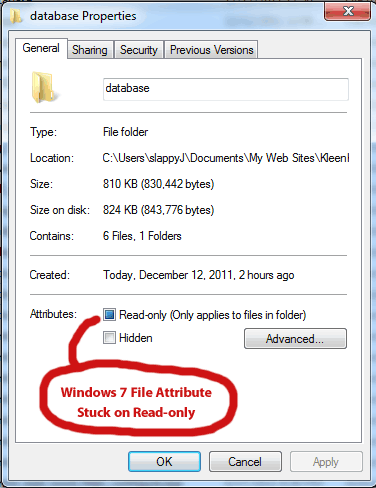
This is what my database Properties folder looks like in Windows Explorer (Windows 7)...


If I try unchecking the Read-only attribute it never stays...when I click OK and then open it up again the Read-only attribute returns.

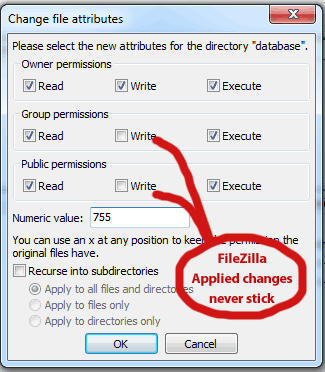
Here is what my database folder looks like (on my host server) through my FTP program FileZilla...


Once again I can try changing permissions but the changes never stick...

When I try to perform the upgrade I still get permission errors...Dead

Any help greatly appreciated.
Back to Top
WebWiz-Bruce View Drop Down
Admin Group
Admin Group
Avatar
Web Wiz Developer

Joined: 03 September 2001
Location: Bournemouth
Status: Offline
Points: 9844
Post Options Post Options   Thanks (0) Thanks(0)   Quote WebWiz-Bruce Quote  Post ReplyReply Direct Link To This Post Posted: 13 December 2011 at 9:37am
You can only set permissions via FTP on Linux servers.

You would need to get your web host to set the read, write, and modify permissions if you can not do it yourself in a control panel they provide you.
Back to Top
slappyJ View Drop Down
Groupie
Groupie
Avatar

Joined: 28 January 2004
Status: Offline
Points: 178
Post Options Post Options   Thanks (0) Thanks(0)   Quote slappyJ Quote  Post ReplyReply Direct Link To This Post Posted: 15 December 2011 at 4:10pm
From my host:

"Unfortunately, since this is a shared environment, we cannot grant you access for schema changes.

The only way to change the schema would be that we backup the database, you make the changes on the database, and we upload it back.

To download and update your database, you can use DTS/SSIS."


Looks like the upgrade is all up to me...what program would I need? what is DTS/SSIS? They made the .bak file available to me but I have no clue what to do with it.

Back to Top
WebWiz-Bruce View Drop Down
Admin Group
Admin Group
Avatar
Web Wiz Developer

Joined: 03 September 2001
Location: Bournemouth
Status: Offline
Points: 9844
Post Options Post Options   Thanks (0) Thanks(0)   Quote WebWiz-Bruce Quote  Post ReplyReply Direct Link To This Post Posted: 15 December 2011 at 4:42pm
Not sure if it is yourself or your host getting the wrong end of the stick, but the permissions have nothing to do with  your SQL Server Database.

They are file permissions on a folder that happens to be called 'database' as it stores connection settings for the database in ASP files in  this folder that need to be written to by the upgrade wizard. 

Ask your web host to give read, write, and modify folder permissions to your the folder name 'database' in your forums folder root.

Once this is done you should be able to upgrade without any problem.
Back to Top
slappyJ View Drop Down
Groupie
Groupie
Avatar

Joined: 28 January 2004
Status: Offline
Points: 178
Post Options Post Options   Thanks (0) Thanks(0)   Quote slappyJ Quote  Post ReplyReply Direct Link To This Post Posted: 16 December 2011 at 1:59am
From my host: as I explained about not having permissions to the database folder on the server...

"As a test i logged onto the folder with FTP and uploaded a simple .txt file to the forums/database. It executed properly and once verified i had taken it out. That folder specifically has all access to it and you should be able to modify as you need to.

In terms of the access codes though (ie from 755 to 644) those cannot be changed and stay at default for stability of the platform as these are already set and cannot be changed.This is set by the platform for which you are on by the vendor (Windows)."

Does this make any sense?

Owner Permissions are set to Read, Write and Execute...I should have full access but still get permission errors while trying to run the upgrade.


I don't have much hair left as much of it has been pulled out...this is getting ridiculous.
Back to Top
WebWiz-Bruce View Drop Down
Admin Group
Admin Group
Avatar
Web Wiz Developer

Joined: 03 September 2001
Location: Bournemouth
Status: Offline
Points: 9844
Post Options Post Options   Thanks (0) Thanks(0)   Quote WebWiz-Bruce Quote  Post ReplyReply Direct Link To This Post Posted: 16 December 2011 at 11:39am
CHMOD which is used to change permissions via FTP is a UNix command and does not work with Windows IIS.

What you see in FileZilla in your image using CHMOD means nothing as FileZilla is not able to read the permissions on the Windows IIS box. Which is also why you can not use FileZilla to set the permissions.

CHMOD 755 to 644 are Unix permissions and have nothing to do with Windows IIS. In Windows the server admin has to set, Read, Wite, and Modify permissions on a directory for the IUSR account that the website runs under.

This is all quite basic stuff for a web host and that fact that your web host is referring to Unix permissions (access codes though (ie from 755 to 644) those cannot be changed)  means that they are completely clueless as to how to run a Windows box.

I suspect that this lack of knowledge means you must be using a host is is a reseller for another company. This will also explain why your host is unable to help you.

I would suggest that you move web host as the replies they have given clearly show they have a lack of understanding of a Windows Hosting environment and should not be trusted to host a Windows website.

Back to Top
 Post Reply Post Reply Page  <123>

Forum Jump Forum Permissions View Drop Down

Forum Software by Web Wiz Forums® version 12.08
Copyright ©2001-2026 Web Wiz Ltd.


Become a Fan on Facebook Follow us on X Connect with us on LinkedIn Web Wiz Blogs
About Web Wiz | Contact Web Wiz | Terms & Conditions | Cookies | Privacy Notice

Web Wiz is the trading name of Web Wiz Ltd. Company registration No. 05977755. Registered in England and Wales.
Registered office: Web Wiz Ltd, Unit 18, The Glenmore Centre, Fancy Road, Poole, Dorset, BH12 4FB, UK.

Prices exclude VAT at 20% unless otherwise stated. VAT No. GB988999105 - $, € prices shown as a guideline only.

Copyright ©2001-2026 Web Wiz Ltd. All rights reserved.